Showing posts with label linux. Show all posts

Thursday, 18 August 2011

The Yak Shavery; J. Dickey, Proprietor

Starting a new project for a new client, coming up to speed on a bit of kit almost like something I poked around with a ways back, and a ferociously Singaporean flu do not make for a productive week. I'm almost back to where I expected to be by noon on Monday. Since it's noon on Thursday

What I'm trying to learn and leverage is Chef, an automated-configuration tool for computer systems (mostly servers). If you want to be able to reliably, repeatably set up a server (or a server farm), Chef or one of several available alternatives, will make your life much easier. Once you get your tool of choice working, that is.

Step One is, as various Chef amateur tutorials suggest, to start out with a plain-vanilla installation of your OS (Linux, in this case) of choice. Rather obviously, getting from bare metal (or bare VM disk platters, if you'd rather) to the basic working system should be push-button automatic as well. "Fine," you say, "nearly every major distro has its own automation system; surely I should be able to just pick up, say, a Red Hat Enterprise Linux clone like CentOS or Scientific Linux and use a Kickstart file, and it should Just Work. Right?"

Close; but then, "close" only counts for scoring purposes in horseshoes and (arguably) the use of hand grenades. This is neither, though it does have the ability to blow up in our faces with unpleasant consequences.

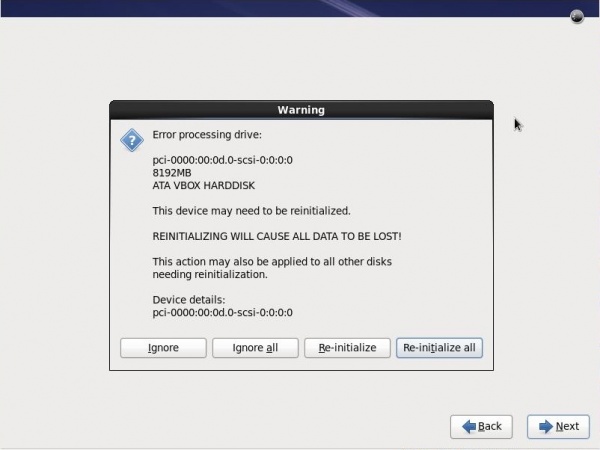
Putting together a basic Kickstart file to set up a base system (on which we can use Chef to complete installation and configuration; the whole point, remember) is itself pretty straightforward. Except for one "little" thing:

A rather scary dialog
(not my actual screenshot; this one courtesy of Máirín Duffy.)

Hitting the "Reinitialize All" button will allow the install to finish as expected, but it's still a manual action in a process that's trying to eliminate such.

Some bit of Google-fu later and asking questions on the #centos channel of irc.freenode.net (thanks, Wolfie!) pointed me to the correct option to set when clearing the disk partitions, and all should have been peachy-keen and wonderful from that point on. Except it wasn't, of course.

Tests conducted with two different versions each of three RHEL clones on my VMWare Fusion 3.1.3 system all failed with a mysterious "cannot read repodata" fatal error being thrown by the installer.

Except, of course, that mounting the DVDs in question and browsing them showed the /repodata directory and contents exactly as they should be. Fast-forward through a day of flailing and fuzzing different options "just to see what happens", and you have a classic yak shave.

So, knowing that I'll have to get the RHEL versions working eventually, and having been previously warned against using Chef-on-Ubuntu as a learning exercise, I'm now spinning up AutoYAST on openSUSE, which is (experientially) what I should have started with from the beginning.

The wall, where my head has banged against it repeatedly, can be repaired. The calendar? Time is the ultimate non-renewable resource.

(Anybody who has any suggestions for Making This Work with RHEL clones, ideally Scientific 6.1 and/or CentOS 6: enlightenment would be Greatly Appreciated.)

Tuesday, 14 September 2010

Saving Effort and Time is Hard Work

As both my regular readers well know, I've been using a couple of Macs1 as my main systems for some time now. As many (if not most, these days) Web developers do, I run different systems (Windows and a raft of Linuxes) using VMWare Fusion so that I can do various testing activities.

Many Linux distributions come with some form of automation support for installation and updates2. Several of these use the (generally excellent) Red Hat Anaconda installer and its automation scheme, Kickstart. Red Hat and the user community offer copious, free documentation to help the new-to-automation system administrator get started.

If you're doing a relatively plain-vanilla installation, this is trivially easy. After installing a new Fedora system (image), for example, there is a file named anaconda-ks.cfg in the root user's home directory, which can be used to either replay the just-completed installation or as a basis for further customisation. To reuse, save the file to a USB key or to a suitable location on your local network, and you can replay the installation at will.

Customising the installation further, naturally, takes significant additional effort — almost as "significant" as the effort required to do the same level of customisation manually during installation. The saving grace, of course, is that this only needs to be done once for a given version of a given distribution. Some relatively minor tinkering will be needed to move from one version to another (say, Fedora 13 to 14), and an unknowable-in-advance amount of effort needed to adapt the Kickstart configuration to a new, different distribution (such as Mandriva), since packages on offer as well as package names themselves can vary between distros3.

It's almost enough to make me pull both remaining hairs out. For several years, I have had a manual installation procedure for Fedora documented on my internal Wiki. That process, however, leaves something to be desired, mainly because it is an intermixture of manual steps and small shell scripts that install and configure various bits and pieces. Having a fire-and-forget system like Kickstart (that could then be adapted to other distributions as well), is an extremely seductive idea.

It doesn't help that the Kickstart Configurator on Fedora 13, which provides a (relatively) easy-to-use GUI for configuring and specifying the contents of a Kickstart configuration file, works inconsistently. Using the default GNOME desktop environment, one of my two Fedora VMs fails to display the application menu, which is used for tasks such as loading and saving configuration files. Under the alternate (for Fedora) KDE desktop, the menu appears and functions correctly.

One of the things I might get around to eventually is to write an alternative automated-installation-configuration utility. Being able to install a common set of packages across RPM-based (Red Hat-style) Linuxes such as Fedora, Mandriva and CentOS as well as Debian and its derivatives (like Ubuntu), and maybe one or two others besides, would be a Very Handy Thing to Have™.

That is, once I scavenge enough pet-project time to do it, of course. For now, it's back to the nuances of Kickstart.

Footnotes:

1. an iMac and a MacBook Pro. (Return)

2. Microsoft offer this for Windows, of course, but they only support Vista SP1, Windows 7 and Windows Server 2008. No XP. Oops. (Return)

3. Jargon. The term distro is commonly used by Linux professionals and enthusiasts as an abbreviation for "distribution"; a collection of GNU and other tools and applications built on top of the Linux kernel. (Return)

Monday, 16 August 2010

Proof Against Most Idiots

Fair warning: Geekish laudatory rant ahead. Still with me? Good!

I suppose it says something less than complimentary about our Craft that, when things actually work in a sensible fashion, recovering from Stupid User Actions™, it's surprising enough to be noteworthy. But I seriously doubt that I'm the only one who's noticed this.

Case in point: yesterday, I started downloading the Debian Linux testing-version DVDs. Yes, plural; there are 8 of them., as the standard software repository comes along with the test build. Anyway...

As most of us do, I was multitasking pretty heavily last night; when I knocked off, I just put my iMac to sleep as usual. It was long after I had gone to bed that I remembered, "hey, wasn't I downloading a passel of Linux DVDs when I slept the system?"

Expecting to have several "interesting" error messages displayed when I woke the system up (if in fact the file system hadn't been somehow damaged... yes, I was used by Windows for far too long), I powered up the system and was about to log in when BAM!... 15 minutes of phone calls. Thoroughly distracted afterwards, I log in, check my email, read a couple of new bug reports for a project I'm working on, and then remember "hey! everything's working!"

I switch to the Terminal window for the download (which was using GNU wget 1.12 if you care), to be greeted by the following display (excerpting):

--2010-08-15 19:45:15--  http://cdimage.debian.org/cdimage/weekly-builds/amd64/iso-dvd/debian-testing-amd64-DVD-6.iso
Resolving cdimage.debian.org (cdimage.debian.org)... 130.239.18.163, 130.239.18.173
Connecting to cdimage.debian.org (cdimage.debian.org)|130.239.18.163|:80... connected.
HTTP request sent, awaiting response... 302 Found
Location: http://caesar.acc.umu.se/cdimage/weekly-builds/amd64/iso-dvd/debian-testing-amd64-DVD-6.iso [following]
--2010-08-15 19:45:20--  http://caesar.acc.umu.se/cdimage/weekly-builds/amd64/iso-dvd/debian-testing-amd64-DVD-6.iso
Resolving caesar.acc.umu.se (caesar.acc.umu.se)... 2001:6b0:e:2018::142, 130.239.18.142
Connecting to caesar.acc.umu.se (caesar.acc.umu.se)|2001:6b0:e:2018::142|:80... failed: No route to host.
Connecting to caesar.acc.umu.se (caesar.acc.umu.se)|130.239.18.142|:80... connected.
HTTP request sent, awaiting response... 200 OK
Length: 4696719360 (4.4G) [application/octet-stream]
Saving to: “debian-testing-amd64-DVD-6.iso”

89% [===============================================================================================>           ] 4,214,102,016 --.-K/s   in 13h 40m 

2010-08-16 09:26:01 (83.6 KB/s) - Read error at byte 4214102016/4696719360 (Operation timed out). Retrying.

--2010-08-16 09:26:04--  (try: 2)  http://caesar.acc.umu.se/cdimage/weekly-builds/amd64/iso-dvd/debian-testing-amd64-DVD-6.iso
Connecting to caesar.acc.umu.se (caesar.acc.umu.se)|130.239.18.142|:80... connected.
HTTP request sent, awaiting response... 206 Partial Content
Length: 4696719360 (4.4G), 482617344 (460M) remaining [application/octet-stream]
Saving to: “debian-testing-amd64-DVD-6.iso”

100%[++++++++++++++++++++++++++++++++++++++++++++++++++++++++++++++++++++++++++++++++++++++++++++++++==========>] 4,696,719,360 1.26M/s   in 6m 26s  

2010-08-16 09:32:50 (1.19 MB/s) - “debian-testing-amd64-DVD-6.iso” saved [4696719360/4696719360]

Note the report of a read error at 09:26:04 on 2010-08-16. The software was complaining that it had to recover from a timeout. Yes, I'm sure ten hours or so significantly exceeds whatever timeout value had been coded into wget... but it never missed a beat (or a byte; the SHA1 checksum matched afterwards).

I'm including the obligatory "don't try this at home, kids!" warning... but, if you aren't sitting in front of Windows, isn't it nice to know you can?

Friday, 15 January 2010

Virtual Real Work

(As posted in a comment on a very detailed Ars Technica review:

After giving PD5 and Fusion 3 full evaluations, I'm going back to Fusion for another cycle.

A lot of what I do is testing software in odd developer builds of various BSDs, Linuxes and OpenSolaris; Fusion gives me the least trouble when venturing away from the Microsoft megalith. I have XP and Win7 VMs too; I just don't fire up either more than once or twice a month. I typically have 2-3 other VMs up and on my network at any given time.

I also did take a good look at OpenBox; it's the best of the bunch for running OpenSolaris (wonder why?), but for anything else, particularly the oddball Linuxes, it gave me as much trouble as PD 5. Where Parallels would crash like a drunken teenager in a Maserati, OpenBox just would not install several important systems. So much for that.

VMWare isn't as slick in some areas as PD5 (LOVE that one-click 'exclude from TM' feature, and the VM list is nice), but it DOES have one feature that's absolutely non-negotiable: It tends to work better/more often. That's worth the extra US$10 or so for the upgrade. (with an additional new license for my new MBP).

I've put about 20 hours over the past 2 months into formal evaluation of the hypervisors mentioned (along with a couple of hundred hours of just using them to run VMs with which I was working, and not trying to think "is this better than...?"). The pain level with Parallels has been fairly consistent; VMWare only surprised me a couple of times. Parallels also gives you only half the review time that VMWare does before you have to pony up. That tells me that they aren't as confident in their product (and rightfully so); there are problems that merely suggest themselves in 15 calendar days of varied use that you could really get a handle on in 30. Not having confidence borne of experience in whether I can solve subtle issues as they arise wasn't the only reason for rejecting Parallels Desktop 5, but it certainly didn't help.

The impression I get from using both products, from reading what has been written and from chatting with other users, is very consistent. VMWare portray themselves as a company that tries, and often succeeds, to do things well - starting with a truly usable, stable, versatile virtualisation platform. Parallels, on the other hand... by bringing out releases well before they're really ready, and with a shorter evaluation time, give the impression that they're desperate for your money. Give it to the company that actually earn it.

Monday, 21 December 2009

When Standing on the Shoulders of Giants, Don't Trip

I've been doing a lot of software installation lately, on Mac OS X and various BSDs and Linuxes. Doing so reminds me of one of the major banes of my life when developing for Windows. If you're a Windows usee, you're acutely familiar with the concept.

DLL Hell.

On Windows, as you install a dozen apps, each of them will try to install their own versions of many system-wide (or vendor-wide) libraries. The poster child for these is msvcrt.dll, the Microsoft C Runtime Library, upon which virtually everything in or running under Windows depends in some fashion. Many unhappy man-millenia have been spent by admins and PC owners the world over trying to resolve compatibility issues, usually introduced when a newly-installed app overwrites a more recent version with the earlier version that app shipped with. Other things — including other libraries the app may depend on or even Windows itself — may break since features and bug fixes they rely on (present in later versions of the library) are suddenly gone.

Why think about this, when I'm as likely to write (or even use) any Windows software in the next month as I am to win the local lottery without buying a ticket?

Because, one of the things I added to my new MacBook Pro was the MacPorts software, which is a Mac analogue to the BSD ports collection. The Linux equivalent to this is (more or less) your package manager, whether it be aptitude or yum or portage or whatever. Windows has no equivalent concept; every app you install is its own universe, or thinks it is (with the "benefits" noted earlier), and no central one-stop "update everything" capability.

Modern operating systems may not have DLL hell, but they do tend to have numerous different versions of different libraries and support frameworks installed. Since those can be accessed by apps as either "give me the most recent version" or "give me version x.y.z", no equivalent to DLL hell takes place. But it does tend to eat up disk space. And it makes it harder to mentally keep track of what's installed; installing the MacPorts edition of Bluefish, an HTML editor, installs some eighty other "ports" — direct or indirect dependencies of Bluefish (which itself is primarily a Linux app). Some of these dependencies are last-month recent updates; a few are several years old. But MacPorts determines which packages are needed by Bluefish (and its dependencies, and...) and installs the latest version (by default) of those dependencies, or the specific version asked for. Thus, several files with the same basic name, but different version numbers encoded into the filename, can coexist peacefully in virtually any modern OS.

Recent Microsoft system software, particularly the "managed" software using the .NET Framework, avoids most of the cavalier instances of DLL hell, but introduces other quirks and brittleness in compensation.

But I'm still a bit unnerved by a software package — any package mdash; that has 80+ designated dependencies. I'm certainly thankful that I don't have to manage that dependency matrix myself.

If modern software development is "standing on the shoulders of giants", to appropriate a Newton paraphrase, then careless dependency introduction would be the functional equivalent of drunken tap-dancing: almost impossible not to trip.

Thursday, 6 August 2009

Smokin' Linux? Roll Your Own!

As people who've encountered the "business end" of Linux have known for some time, the system (in whichever distribution you prefer, greatly rewards (some would say 'requires') tinkering and customisation. This can be done with any Linux system, really; some distros, like LinuxFromScratch and, to a lesser degree, Gentoo and its derivatives, explicitly assume that you will be customizing their base system according to your specific needs.

Now the major distros are getting into it. There have been various Ubuntu and Fedora customisation kits on the Net, but none as far as I can tell that are as directly supported (or easy to use) as from OpenSUSE, the "community-supported" offering from Novell (who also offer SUSE Linux Enterprise Desktop and Server.

Visit the OpenSUSE site, and prominently visible is a link to the OpenSUSE Build Service, which "allows developers to package software for all major Linux distributions", or at least those that use rpm packaging, the packaging system used by Red Hat, Mandriva, CentOS, and other similar systems. But that's not all...

SUSE now have a new service, SUSE Studio, which allows users to create highly customized systems based on either the community (OpenSUSE) or enterprise versions of SUSE Linux. These "appliances" can be put together on the basis of "patterns", such as lamp_server (LAMP, or Linux/Apache/MySQL/PHP Web server) or technical_writing (which includes numerous tools like Docbook). You can even supply your own (either self-built or acquired elsewhere) RPM packages to include in the appliance you're building, and SUSE Studio will deal with the dependency matching (warning you if packages are required that aren't either among its standard set or uploaded by you).

Startup scripts, networking, basically anything that is usually handled through the basic installation or post-installation configuration - all can be configured within the SUSE Studio Web interface.

And then, when you've got your system just the way you want it, you can build it as either an ISO (CD/DVD) image to be downloaded and burned onto disc, or as a VM image for two of the most popular VM systems (VMWare and Xen).

But wait, there's more...

Using a Flash-enabled browser, you can even "test drive" your appliance, testing it while running (transparently) in an appropriate VM hosted within the SUSE Studio infrastructure. Especially if you have a relatively slow connection, this will let you do preliminary "smoke testing" without having to download the actual image to your local system. Once you're ready to do so, of course, downloading is very nearly a single-click affair. Oh, and you're given (presently) 15 GB of storage for your various builds - so you can easily do comparative testing.

What don't I like about it? In the couple of hours I've been messing around with it today, there's really only one nagging quibble: When you do the "test drive" of your new creation, the page you're running it in is a standard, non-secure http Web page. The page warns you that any data and keystrokes sent will not be encrypted, and recommends the use of ssh if that is a concern (by which most people will think https). But there's no obvious way to switch, and shutting down the running appliance (which starts by the time you read the warning) involves keystrokes and so on...

In fairness, this is still very clearly a by-invitation beta offering (but you can ask for an invite), and some rough edges are to be expected. I'm sure I'll run into another one or two as things go on. I'm equally certain that all the major problems will be smoothed out before SUSE Studio goes into general public availability.

So, besides the obvious compulsive hackers and the people building single-purpose appliance-type systems, who would really make use of this?

One obvious use case, which the SUSE Studio site describes, is as a canned demo of a software system. If you're an ISV, you can add your software or Web app to a SUSE Studio appliance, lock down the OS image to suit (encrypting file systems and so on), and hand out your discs at your next trade show (or have them downloadable from your Website). No worries about installing or uninstalling from prospective customers' systems; boot from the CD (or load it into a VM) and they're good to go.

Another thought that hit me this morning was for use as an interview filter. This can be in either of two distinct modes. First, you might be looking for people who are really familiar with how Linux works. Write up the specs of a SUSE Studio appliance (obviously more demanding than just the click-and-drool interface) and use an app of your own devising to validate the submitted entries. This validation could be automated in any of several ways.

The second possible interview filter would be as a programming/Web dev system. As a variation on the "ISV" example above, you load up an appliance with a set of tools and/or source files, ready to be completed and/or fixed by your candidates. They start up the appliance (either a live CD or VM), go through your instructions for the test, and then submit results (probably an encrypted [for authentication] archive of all the files they've touched, as determined by the base system tools) via email or FTP. On your end, you have a script that unpacks the submission into a VM and uses the appropriate automated testing tools to validate it. I can even see this as a business model for someone who offers this capability as a service to companies wishing to have a better filter for prospective candidates than resume-keyword matching - which as we all know is practically useless due to the high number of both false negatives and false positives.

What do you all think?

Tuesday, 4 August 2009

The Debate between Adequacy and Excellence

I was clicking through my various feeds hooked into NetNewsWire, in this case The Apple Core column on ZDNet, when I came across this item, where the writer nicely summed up the perfectly understandable strategy Microsoft have always chosen and compared that with Apple and the Mac. Go read the original article (on Better Living without MS Office and then read the comment.

As I've commented on numerous times in this blog and elsewhere (notably here), I'm both very partial to open standards (meaning open data formats, but usually expressed in open source implementations) and to the Apple Mac. As I've said before, and as the experience of many, many users I've supported on all three platforms bears out, the Mac lets you get more done, with less effort and irritation along the way, than either Windows or Linux as both are presently constructed.

But the first two paragraphs of this guy's comment (and I'm sorry that the antispam measures on ZDNet apparently don't permit me to credit the author properly) made me sit up and take notice, because they are a great summation of how I currently feel about the competing systems:

The Macs vs. PC debate has been going on for about 25 years or so, but the underlying debate is much older. What we are really discussing is the difference between adequacy and excellence. While I doubt I would want to be friends with Frank Lloyd Wright or Steve Jobs, both represent the exciting belief in what is possible. While Bill Gates and Steve Ballmer rake in billions, their relative impact on the world of ideas is miniscule.

Bill Gates understands that business managers are on the whole are a practical, albeit uninspired and short-sighted bunch. By positioning Microsoft early on to ride into the enterprise with the implicit endorsement of one of the biggest, longest-lived, and influential suppliers of business equipment, Gates was able to secure Microsoft's future. Microsoft's goal has never seemed to me to be to change the world, only to provide a service that adequately meets business needs. Microsoft has also shown from early on a keen awareness that once you get people to use your product, your primary goal is not to innovate to keep your customers, but, rather to make leaving seem painful and even scary. Many companies do this, but Microsoft has refined this practice into an art.

He then expands on this theme for four more paragraphs, closing with

Practically speaking Microsoft is here to stay. But I am glad that Apple is still around to keep the computer from becoming dreary, to inspire people to take creative risks, to express themselves, and to embrace the idea that every day objects, even appliances like the computer, can be more than just the sum of their functions.

Aux barricades! it may or may not be, depending on your existing preferences and prejudices. But it does nicely sum up, more effectively and efficiently than I have been able to of late, the reasons why Apple is important as a force in the technology business. Not that Microsoft is under imminent threat of losing their lifeblood to Apple; their different ways of looking at the world and at the marketplace work against that more effectively than any regulator could. But the idea that excellence is and should be a goal in and of itself, that humanity has a moral obligation to "continually [reach] well past our grasp", should stir passion in anyone with a functioning imagination. Sure, Microsoft have a commanding lead in businesses, especially larger ones — though Apple's value proposition has become much better there in the last ten years or so; it's hard to fight the installed base, especially with an entrenched herd mentality among managers. But, we would argue, that does not argue that Apple have failed, any more than the small number of buildings designed by Frank Lloyd Wright and his direct professional disciples argue for his irrelevance in architecture. If nobody pushes the envelope, if nobody makes a habit of reaching beyond his grasp, how will the human condition ever improve? For as Shaw wrote,

The reasonable man adapts himself to the world. The unreasonable man persists in trying to adapt the world to himself. All progress, therefore, depends upon the unreasonable man.

And that has been one of my favourite quotes for many years now.

Friday, 10 July 2009

"You can have my...when you pry it out of my cold, dead hands"

One of the, shall we say, unusual things about being in this line of work is that you develop stronger-than-is-healthy bonds to particular bits and pieces of technology, both hardware and software. For example, I think that anybody who's worked on a Mac as their main system for a year or so would take a catastrophic productivity hit if they were required to work in a Windows-only environment. Further, I assert, based on experience and observation, that this hit would actually increase in severity commensurate with previous Windows experience, as the nature of the problems and hassles encountered on a continuous basis would be that much more familiar.

But, believe it or not, this isn't a hit piece on Windows. If anything, Mac OS X takes the brunt here, in more or less a continuation of a previous post.

Don't get me wrong. The Mac itself is still one of the very few things I'd plug into that quote in the title. But the differences between it and the BSD Unix heritage it's based on, at an architecture-implementation level, sometimes drive me up the wall; it's as though I'm caught in the old Saturday Night Live "It's a floor wax AND a dessert topping!" skit.

Case in point: the Web developer's Swiss Army Ginsu Knife, PHP. On Unix and Linux systems, it's very straightforward to build a scripting engine that contains just the features and extensions needed, with security and debugging features added in to taste. The last few releases have even made that process humanly feasible for Windows usees. On Mac OS X, however, it's a different story entirely. (Item: As of Friday 11 July, the search "mac php configuration" returned some 5.22 million hits. Applying Sturgeon's Second Law to this leaves us with at least half a million pleas for and/or offers of help.)

The practical result is that, on Mac OS X, one uses one of the various prebuilt binaries for PHP (from Apple, MacPorts, MAMP or similar — or goes without. If you're interested enough in PHP to want it to work on a Mac, you probably have some urgent deadline breathing down your neck; you don't have time to figure out how/why there are unique runes and incantations involved in making it work. This is the dark flip side of "almost everything Just Works"; the things that don't Just Work tend to average the entire experience out.

So, what's the most efficient solution for the reasonably serious Mac-loving Web developer? Simple: max out the memory in your Mac (and I do mean "as much as Steve&Co let you put in and not one byte less, blastit!"). Then, add one of the software tools that's going to be on that Mac somebody pries out of my "cold, dead hands"; VMWare Fusion. Once you have Fusion installed, grab an ISO image of your BSD version or Linux distro of choice, install it, and use that for your PHP and other web-dev activities.

Better still, you can still use your fave Mac editor, browser and so on during development in the VM; you'll want to set up ssh on your VM, and then use sshfs to mount your Linux/BSD filesystem as a disk volume in your Mac. From that point — a file is a file is a file; you're just taking advantage of the *ix VM's tools. This is how I do my PHP 5.3 and PHP 6 testing now.

And, after going through all this extra effort, you may well pray that the new version of Mac OS X enables a better native solution. I know I do.

Nothing is perfect in this world, and all technologies have speed bumps in some fashion. The good bad thing about OS X is that there aren't nearly as many as in some other systems I could name — but when you hit the ones that are there, you hit them hard.


EDITED 2010/11/03: At the time this was originally written, there was a prerelease bit of software that lots of people, including the vendor and the opportunistic authors and publisher of at least one programming book, thought was going to eventually become PHP version 6. Not quite; one of the long-promised features for PHP 6 went down a rabbit hole and ultimately killed the whole thing. Most of the usable "PHP 6" features were incorporated into version 5.3.2.

Tuesday, 23 December 2008

Maybe not eating 'crow', specifically, but..... DUCK!!!

As in, "bend over, here it comes again..."

One of the things I have greatly appreciated about the Mac, especially with OS X, is how simple and straightforward software management is, compared to Linux and especially Windows (where every system change is a death-defying adventure against great odds). Operating system or Apple-supplied apps need an update? Software Update is as painless as it gets: the defaults Just Work in proper Mac fashion, but you can set your own schedule, along with a few other options. There is a well-established convention for third-party apps to check for updates via a Web service "phoning home" at app startup; this has been very easy to deal with. Application and file layout is regular and sensible; libraries and resources are generally grouped in bundles at the system or user level. After a few years of DLL hell in Windows and library mix-and-match in Linux, this was shaping up to be a real pleasure.

Then, as some of you know, I updated Mac OS X on my iMac from 10.5.5 to 10.5.6. As expected, that apparently went as smooth as glass. I even blogged about it. XCode worked; MS Office 2008 for the Mac worked; Komodo Edit worked; all my IM clients worked; all seemed customarily wonderful in the omniverse. I even started up Mail; it opened normally and happily downloaded my regular mail and Google mail, just as it had done every day for months. (I didn't actually open any messages then; that will turn out to be important.) Satisfied that everything Just Worked as always, I went back to working on a project for a few hours before turning in for the night.

Next morning, I went through the usual routine. Awake the Mac from hibernation; log in; start Yahoo, MSN and Skype; start Mail; open Komodo; open Web browsers (Safari, Opera and Camino) and I'm ready to get started. First thing...here's an interesting-sounding email message; let's open that up and... *POOF* — Mail crashes.

WTF? It started up just fine; I even got the "Message for you, Sir" Monty Python WAV I'd set Mail to use as my new-mail-received notification. I start Mail again. Picking a different message, I double-click it in the inbox. A window frame opens with the message title, sits empty for a few hundred milliseconds, then Mail goes away again. Absolutely, totally repeatable. Reboot changes nothing. Safe Boot (the Mac equivalent of Windows' "safe mode") changes nothing. The cold fingers of panic stroke my ribs like Glenn Gould at the piano. On a bad-karma scale of 0 to 10, initial reaction is an "O my God"; we're not dead, but we're hurt bad; the karma has definitely run over the dogma. 

The next couple of days are spent using my ISP's Webmail service, and a set of Python scripts I'd previously written to search mailbox contents — Apple Mail, like any sensible email program, adheres to established standard formats. If I'd been using Microsoft Lookout! in a similar situation, I'd have been up the creek.

Finally, I come across some Web-forum items that indicate that GPGMail needs to be updated; if it's not, Mail will crash under OS X 10.5.6 — which is exactly what was happening. (If you're not using GPGMail, GNU Privacy Guard, or any of the various GPG interfaces for Windows such as Enigmail for Mozilla Thunderbird, you don't know how many people are recording and/or reading your email — but if it transits a server in the US or UK, it's guaranteed that it will be.

Installing the upgraded GPGMail bundle was the work of less than two minutes (hint: remove or rename the old bundle before copying the new one over. You probably don't need the insurance, but consider how we got here...). Then start up Mail as usual. It should, once again, Just Work — complete with being able to read and reply to messages, with or without GPG signatures.

OK, so what lessons can we take away from this experience, both as users and developers?

Time Machine may well be the single most rave-worthy piece of software I've touched in 30 years, but it can't (obviously, easily) do everything, and in a crisis, even experienced users may well not want to risk bringing too much (or too little) "back from history". There's definitely a market for addons to TM to do things like "look in my user and system library directories, the Application directory structure, MacPorts, etc., and bring application Foo back to the state it was in last Tuesday morning, but leave my data files as they are." I almost certainly could do that with the bare interface -- but, especially since it was "broken" as part of an OS upgrade, and (with the Windows/Linux experience fresh in mind) not comfortable exploring hidden dependencies... I was without my main email system for three days. Sure, I had workarounds -- that I wouldn't have had if I'd been in a stock Windows situation -- but that's not really the point, is it?

Also, app developers (Mac or other), add this to your "best practices" list: If your software uses any sort of plug-in/add-on architecture, where modules are developed independently of the main app, then you can have dependency issues. The API you make available to your plugin developers will change over time (or your application will stagnate); if you make it easy for them (and your users) to deal with your latest update, you'll be more successful. There's (at least) two ways to go about doing this:

The traditional "brute force" approach. Have a call you can use to tell plugins what version of the app is running, and allow them to declare whether or not they're compatible with that version. Notify the user about any that don't like your new version. For examples of this, see the way Firefox and friends deal with their plugins. Yes, it works, but it's not very flexible; a new version may come out that doesn't in fact modify any of the APIs you care about — which means that the plugin should work even though it was developed against version 2.4 of your app and you're now on 4.2.

Alternatively, a more fine-grained approach. Group your API into smaller, functional service areas (such as, say, address-book interface or encryption services for an email program). Have your plug-in API support a conversational approach.

  1. The app calls into the plugin, asking it which services it needs and what versions of each it supports.
  2. The app parses the list it gets back from the plugin. If the app version is later than the supported range for a specific feature identified by the plugin, add that to a "possibly unsupported" list. (If the app version is earlier than the range supported by the plugin, assume that it's not supported and go on to check the next one.)
  3. If the "possibly unsupported" plugin list is empty, go ahead and continue bringing up the app, loading the plugins normally; you're done with this checklist.
  4. For each item in the "possibly unsupported" list, determine whether the API for each feature required for the plugin has changed since the plugin was explicitly supported. (This is how a plugin for an earlier release, say 2.4, could work just fine with a later version, like 4.2.) If there's no change in the APIs of each feature required by the plugin, remove that plugin from the "possibly unsupported" list.
  5. If any plugins remain in the list, check if there's an updated version of that plugin on the Net. This might be done using a simple web-service-to-database-query on your Web server. If your Web server knows of an update, ask the user for permission to install it. If the user declines, or no upgrade is available, unload the plugin. (You'll check again next time the app is started; maybe there's an update by then.)
  6. Once the status of each plugin has been established, and compatible plugins loaded, finish starting up your app.

Of course, there are various obvious optimisations and convenience features that can be built into this. Any presentation to the user can and likely should be aggregated; "here's a list of the plugins that I wasn't able to load and couldn't find updates for." Firefox and friends are a good open-source example of this. The checks for plugin updates can also be scheduled, so as not to slow down every app startup. This might be daily, weekly, twice a month, whatever; the important thing is to let the user configure that schedule and view a list of plugins that are installed but not active.

As I started this post by saying, I've been very favorably impressed by Mac apps' ease of use (including installation and maintenance). Mail fell down and couldn't get up again without outside assistance; this is unusual. The fact that this was caused by a plugin and that Mail could not detect and work around the conflict just amazes me; I expect more from Apple. I'm not ready to decrease my use of the Mac because this happened — but I am going to pay more attention to how things work under the hood. The fact that I have to even be aware of this -- which is one of the features that hitherto distinguished the Mac from the grubbier Windows and Linux alternatives -- is worrisome.

Again, your comments are welcome.
Tuesday, 16 December 2008

Happy Updating....

If you're a Windows usee with a few years' experience, you've encountered the rare, monumental and monolithic Service Packs that Micorosoft release on an intermittent basis (as one writer put it, "once every blue moon that falls on a Patch Tuesday"). They're almost always rollups of a large number of security patches, with more added besides. Rarely, with the notable (and very welcome at the time) exception of Windows XP Service Pack 2, is significant user-visible functionality added. Now that SP3 has been out for seven months or so, it's interesting to see how many individuals and businesses (especially SMEs) haven't updated to it yet. While I understand, from direct personal experience, the uncertainty of "do I trust this not to break anything major?" (that is, "anything I use and care about?"), I have always advised installing major updates (and all security updates) as quickly as practical. Given the fact that there will always be more gaping insecurities in Windows, closing all the barn doors that you can just seems the most prudent course of action.

I got to thinking about this a few minutes ago, while working merrily away on my iMac. Software Update, the Mac equivalent of Windows' Microsoft Update, popped up, notifying me that it had downloaded the update for Mac OS X 10.5.6, and did I want to install it now? I agreed, typed my password when requested (to accept that a potentially system-altering event was about to take place, and approve the action), and three minutes later, I was logged in and working again.

Why is this blogworthy? Let's go back and look at the comparison again. In effect, this was Service Pack 6 for Mac OS X 10.5. Bear in mind that 10.5.5 was released precisely three months before the latest update, and 10.5.0 was released on 26 October 2007, just under 14 months ago. "Switchers" from Windows to Mac quickly become accustomed to a more pro-active yet gentle and predictable update schedule than their Windows counterparts. The vast majority of Mac users whom I've spoken with share my experience of never having had an update visibly break a previously working system. This cannot be said for Redmond's consumers; witness the flurry of application and driver updates that directly follow Windows service packs. XP SP2, as necessary and useful as it was, broke more systems than I or several colleagues can remember any single service pack doing previously...by changing behavior that those programs had taken advantage of or worked around. Again, the typical Mac customer doesn't have that kind of experience. Things that work, just tend to stay working.

Contrast this with Linux systems, where almost every day seems to bring updates to one group of packages or another, and distributions vary wildly in the amount of attention paid to integrating the disparate packages, or at least ensuring that they don't step on each other. Some recent releases have greatly improved things, but that's another blog entry. Linux has historically assumed that there is reasonably competent management of an installed system, and offers resources sufficient for almost anyone to become so. Again, recent releases make this much easier.

Windows, on the other hand, essentially requires a knowledgeable, properly-equipped and -staffed support team to keep the system working with a minimum of trouble; the great marketing triumph of Microsoft has been to both convince consumers that "arcane" knowledge is unnecessary while simultaneously encouraging the "I'm too dumb to know anything about computers" mentality — from people who still pony up for the next hit on the crack pipe. Show me another consumer product that disrespects its paying customers to that degree without going belly-up faster than you can say "customer service". It's a regular software Stockholm syndrome.

The truth will set you free, an old saying tells us. Free Software proponents (contrast with open source software) like to talk about "free as in speech" and "free as in beer". Personally, after over ten years of Linux and twenty of Windows, I'm much more attracted by a different freedom: the freedom to use the computer as a tool to do interesting things and/or have interesting experiences, without having to worry overmuch about any runes and incantations needed to keep it that way.

Wednesday, 3 December 2008

Modern Tools and Archaic Practices Shouldn't Mix

Sun have released NetBeans 6.5, which, among many other (potentially) useful and interesting features, claims to officially support Web development using PHP. This is, on the face of things, a major improvement from the situation under NB 6.1 and prior, which treated PHP essentially as other unsupported languages were treated: you could do raw text editing, but the features that are the entire point of using an IDE - auto-completion, search/cross-reference, and so on - were completely absent. Not so in 6.5; at least minimal support for features like code completion, auto-display of PHPDoc during code entry, and so on can be found here. After a few minutes of poking around, I was starting to get optimistic; here was a decent, if somewhat more heavyweight, alternative to the Komodo Edit which I had been using for some months. Why look for alternatives when I was extremely happy with Komodo Edit for the Mac? Because, almost every day, I sat down in front of Komodo Edit for Linux, and became frustrated with the inconsistencies, limitations and general less-polished feel (Why can't ActiveState include KE for Mac key emulation along with vi and emacs?)

So, back to NetBeans and PHP. I spent a few minutes putting together toy code just to see how the editor felt. Then I created the really one-and-only sample PHP project that came with NB 6.5, a site for a fictional India-based budget airline. Go through the 'New Project' wizard, select the project type, the directory to be used to contain the entire thing (for development, at least), and hit The Magic "Finish" Button.

And, voilà, a new project is born:

At first blush, nothing too obviously catastrophic. Rather non-semantic names for the image files, and the files under 'include' generally presume that you'll only ever need one nav bar, for example, but hey, it's a sample project, I tell myself. It's not necessarily meant to be production-quality; it's supposed to give you a starting point to either see how to use NetBeans to work in the PHP you already know, or how to use this PHP that's all over the Web in the NetBeans you've been using earlier versions of.

And then I double-click on the index.php file in the Projects pane. And my jaw hits the floor as I see... 1996-ASP-style intermingling of PHP code and raw HTML. OK, the DTD is from 1999 and the PHP code uses superglobals, which date from 2001, but you get the idea.

We've spent the better part of a decade, as a craft, running screaming away from this style of work. No sane, experienced PHP developer would write code like this today; we may not have (quite) advanced to the point where "everybody" uses the same tools for similar projects, but separation of presentation (HTML) and logic (PHP) is pretty universally seen as not just a Good Thing® but a Necessary Thing® if the site is ever going to be debugged/maintained. There are just so many problems that conmingled code and markup create, unnecessarily, in living code. I'm well aware that a 'toy' example for a general-purpose editor-with-benefits can not (and arguably should not) try to teach tyros the basics of the language in question.

But is it really too much to ask that such an example be written in a reasonably modern and correct style, or at least put big red (say, 144-point Comic Sans) warnings to the effect, "DANGER: If you don't know why this is  horrible practice, please go buy a book! The job you save may well be your own."

Still using the free Komodo Edit on the Mac, trying to justify shelling out for the "real" Komodo IDE... but that's a deliberation for another post.

Wednesday, 23 July 2008

Differences that Make Differences Are Differences

(as opposed to the Scottish proverb, "a difference that makes no difference, is no difference")

This is a very long post. I'll likely come back and revisit it later, breaking it up into two or three smaller ones. But for now, please dip your oar in my stream of consciousness.

I was hanging around on the Freenode IRC network earlier this evening, in some of my usual channels, and witnessed a Windows zealot and an ABMer going at it. Now, ordinarily, this is as interesting as watching paint dry and as full of useful, current information as a 1954 edition of Правда. But there was one bit that caught my eye (nicknames modified for obfuscation):

FriendOfBill: Admit it; Microsoft can outmarket anybody.
MrABM: Sure. But marketing is not great software.
FriendOfBill: So?
MrABM: So... on Windows you pay for a system and apps that aren't worth the price, on Linux you have free apps that are either priceless or worth almost what you pay (but you can fix them if you want to), and on the Mac, you have a lot of inexpensive shareware that's generally at least pretty good, and commercial apps that are much better. THAT's why Microsoft is junk... they ship crap that can't be fixed by anyone else.
FriendOfBill: So you're saying that the Linux crap is good because it can be fixed, and the Mac being locked in is OK because it's great, but Windows is junk because it's neither great nor fixable?
MrABM: Exactly. Couldn't have said it better myself.

Now...that got me to thinking. Both of these guys were absolutely right, in my opinion. Microsoft is, without question, one of the greatest marketing phenomena in the history of software, if not of the world. But it is unoriginal crap. (Quick: Name one successful Microsoft product that wasn't bought or otherwise acquired from outside. Internet Explorer? Nope. PowerPoint? Try again.) Any software system that convinces otherwise ordinary people that they are "stupid" and "unable to get this 'computer' thing figured out" is not a net improvement in the world, in my view. I've been using and developing for Windows as long as there's been a 'Windows'; I think I've earned the opinion.

Linux? Sure, which one? As Grace Hopper famously might have said, "The wonderful thing about standards is that there are so many of them to choose from." (Relevant to The Other Side: "The most dangerous phrase in the language is, 'We've always done it this way.'") As can be easily demonstrated at the DistroWatch.com search page, there are literally hundreds of active "major" distributions; the nature of Free Software is such that nobody can ever know with certainty how many "minor" variants there are (the rabbits in Australia apparently served as inspiration here). Since every distribution has, by definition, some difference with others, it is sometimes difficult to guarantee that programs built on one Linux system will work properly on another. The traditional solution is to compile from source locally with the help of ingenious tools like autoconf. Though this (usually) can be made to work, it disproportionately rewards deep system knowledge to solve problems. The "real" fix has been the coalescence of large ecosystems around a limited number of "base" systems (Debian/Ubuntu, Red Hat, Slackware) with businesses offering testing and certification services. Sure, it passes the "grandma test"....once it's set up and working.

The Macintosh is, and has been for many years, the easiest system for novice users to learn to use quickly. Part of that is due to Apple's legendary Human Interface Guidelines; paired with the tools and frameworks freely available, it is far easier for developers to comply with the Guidelines than to invent their own interface. The current generation of systems, Mac OS X, is based on industry-standard, highly-reliable core components (BSD Unix, the Mach microkernel, etc.) which underpin an extremely consistent yet powerful interface. A vast improvement over famously troubled earlier versions of the system, this has been proven in the field to be proof against most "grandmas".

A slight fugue here; I am active in the Singapore Linux Meetup Group. At our July meeting, there was an animated discussion concerning the upcoming annual Software Freedom Day events. The question before the group was how to organize a local event that would advance the event's purpose: promoting the use of free and open source software for both applications and systems. What I understood the consensus to be basically worked out as "let's show people all the cool stuff they can do, and especially let's show them how they can use free software, especially applications, to do all the stuff they do right now with Windows." The standard example is someone browsing the Web with Firefox instead of Internet Explorer; once he's happy with replacement apps running under Windows, it's easier to move to a non-Windows system (e.g., Linux) with the same apps and interface. That strategy has worked well, particularly in the last couple of years (look at Firefox itself and especially Ubuntu Linux as examples). The one fly in the ointment is that other parts of the system don't always feel the same. (Try watching a novice user set up a Winprinter or wireless networking on a laptop.) The system is free ("as in speech" and "as in beer") but it is most definitely not free in terms of the time needed to get things working sometimes... and that cannot always be predicted reliably.

The Mac, by comparison, is free in neither sense, even though the system software is based on open-source software, and many open-source applications (Firefox, the Apache Web server) run just fine. Apache, for instance, is already installed on every current Mac when you first start it up. But many of the truly "Mac-like" apps — games, the IRC program I use, a nifty note organizer, and so on) are either shareware or full commercial applications (like Adobe Photoshop CS3 or Microsoft Word:mac). You pay money for them, and you (usually) don't get the source code or the same rights that you do under licenses like the GNU GPL.

But you get something else, by and large: a piece of software that is far more likely to "just work" in an expectable, explorable fashion. Useful, interesting features, not always just more bloat to put a few more bullet items on the marketing slides. And that gives you a different kind of freedom, one summed up by an IT-support joke at a company I used to work for, more than ten years ago.

Q: What's the difference between a Windows usee and a Mac user?
A: The Windows usee talks about everything he had to do to get his work done. The Mac user...shows you all the great work she got done.
That freedom may be neither economic or ideological. But, especially for those who feel that the "Open Source v. Free Software" dispute sounds like a less entertaining Miller Lite "Tastes Great/Less Filling" schtick, for those who realize that the hour they spend fixing a problem will never be lived again, this offers a different kind of freedom: the freedom to use the computer as an appliance for interesting, intellectually stimulating activity.

And having the freedom to choose between the other, seemingly competing freedoms... is the greatest of these.

Friday, 11 July 2008

Does anybody else have a problem with this?

If you've got an ssh connection to a Debian or Ubuntu Linux box handy, and you have sudo privileges on that box, try this little experiment:
  1. ssh to your box as an ordinary user;
  2. sudo su to get a root prompt (you should be asked for your password - this is important);
  3. as soon as you get the root prompt, exit back to normal user, then exit your ssh session entirely.
Now, here's the scary part:
  1. ssh to that same box again right away, as the same user;
  2. sudo su to get a root prompt again.
Why is this scary? Because the second time you ask for a root prompt, you're not prompted for a password. This means that, not only does the actual Linux box require access and user security appropriate to its function, but so does every device that can ssh into it with a rootable user! I'm sure this isn't in any way new, but in 10+ years of using Linux, I just now encountered that scenario for the very first time. As Linux is becoming more popular, and more users are marching up the 'power user' scale, this is something that should be paid attention to - especially in a business environment. Yowza!

Thursday, 10 July 2008

Standard Standards Rant, Redux: Why the World-Wide Web Isn't "World-Wide" Any More

The "World Wide Web", to the degree that it was ever truly universal, has broken down dramatically over the last couple of years, and it's our mission as Web development professionals to stand up to the idiots that think that's a Good Thing. If they're inside our organization, either as managers or as non-(Web-)technical people, we should patiently explain why semantic markup, clean design, accessibility and (supporting all of the above) standards compliance are Good for Business. (As the mantra says, "Google is your most important blind customer," because your prospective customers who know what they're looking for but don't yet know who they're buying it from find you that way.) Modern design patterns also encourage more efficient use of bandwidth (that you're probably paying for), since there's less non-visible, non-semantic data in a properly designed nest of divs than in an equivalent TABLE structure. Modern design also encourages consistent design among related pages (one set of stylesheets for your entire site, one for your online product-brochure pages, and so on). Pages that look like they're related and are actually related reassure the user that he hasn't gotten lost in the bowels of your site (or strayed off into your competitor's). It's easier to make and test changes that affect a specified area within your site (and don't affect others). It's easier to add usability improvements, such as letting users control text size), when you've separated content (XHTML) from presentation (CSS and, in a pinch, JavaScript). Easier-to-use Web sites make happier users, who visit your site more often and for longer periods, and buy more of your stuff.

Experienced Web developers know all this, especially if they've been keeping up with the better design sites and blogs such as A List Apart. But marketing folks, (real) engineers and sales people don't, usually, and can't really be expected to -- any more than a typical Web guy knows about internal rate of return or plastic injection molding in manufacturing. But you should be able to have intelligent conversations with them, and show them why 1997 Web design isn't usually such a good idea any more. (For a quick Google-eye demo, try lynx).  Management, on the other hand, in the absence of PHBs and management by magazine, should at least be open to an elevator pitch. Make it a good one; use business value (that you can defend as needed after the pitch).

That's all fine, for dealing with entrenched obsolescence within your own organization. What about chauvinism outside — from sites you depend on professionally, socially or in some combination? For years, marginalized customers have quietly gone elsewhere, with at most a plaintive appeal to the offenders, pointing out that a good chunk of Windows usees don't browse with Internet Explorer anymore (check out the linked article; a major business-tech Website from 2004(!!); the arguments are much stronger now). But some companies, particularly Microsoft-sensitive media sites like CNet and its subsidiary ZDNet, still don't work right when viewed with major non-Windows browsers (even when the same browser, such as Opera or Safari, works just fine with that site from Windows). And then there are the sites for whom their Web presence is the entire company, but they haven't yet invested the resources into competent design required to take their site construction from a point-and-drool interface virtually incapable of producing standards-compliant work, and instead present a site that a) actively checks for IE and snarls at you if you're using anything else, and b) has their design so badly broken and inaccessible that people stay away in droves. (Yes, I'm looking at you — every click opens a new window).

When we encounter Web poison like this, we should take the following actions:

  • Notify the site owner that we will use a better (compatible, accessible, etc.) site, with sufficient details that your problem can be reproduced (flamemail that just says "Teh site sux0rs, d00d!" is virtually guaranteed to be counterproductive);
  • When you find an acceptable substitute, let that site's owners know how they earned your patronage. Send a brief thank-you note to one or two of their large advertisers (if any), as well as to the advertisers on the site you've left (if you know any). Politely thank them for supporting good Web sites, or remind them why their advertising won't be reaching you anymore (as appropriate);
  • Finally, there really ought to be a site (if there isn't already) where people can leave categorized works/doesn't-work-for-me notes about sites they've visited. This sounds an awful lot like the original argument for Yahoo!; I can see where such a review site would either die of starvation or grow to consume massive resources. But praise and shame are powerful inducements in the offline world; it's long past time to wield them effectively online.
I'm sure that there are literally millions of sites with Web poison out there, and likely several "beware" sites as well. For the record, the two that wasted enough of my week this week to deserve special dishonor are ZDNet and JobStreet. Guys, even Microsoft doesn't lock people out and lock browsers up the way you do; I can browse MSDN and Hotmail just fine on my Mac, on an old PC with Linux, or on an Asus Eee. And if you need help, I and several thousand others like me are just an email away. :-)

Saturday, 10 May 2008

ANFSD: starting a series to scratch an itch

(And Now For Something Different, for the 5LA-challenged amangst you...)

I've made my living, for about half my career, on the proposition that if I stayed (at least) three to six months ahead of (what would become) the popular mean in software technology, I'd be well-positioned to help out when Joe Businessman or Acme Corporation came along and hit the same technology — with the effect of "Refrigerator" Perry hitting a reinforced-concrete wall. This went reasonably well as "the market" started using PCs, then GUIs, then object-oriented programming, and then "that Internet thingy" (Shameless plug: résumé here or in PDF format).

In other ways, I've been a staunch traditionalist. I've used IDEs from time to time, because I was working as part of a team that had a standard tool set, or because I was programming for Microsoft Windows and the Collective essentially requires that that be done in their (seventh-rate) IDE unless you want to decrease productivity by several dozen orders of magnitude.

Otherwise, just give me KATE or BBEdit and a command-line compiler and I'm happy. This continued for a significant chunk of the history of PCs, until I decided that, for the Java work I was doing, I really needed some of the whiz-bang refactoring and other tie-ins supported by Eclipse and NetBeans. Then I started hacking around on a couple of open-source C++ packages and thought I'd give the Eclipse C/C++ Development Tooling a try. Now I'm coming up to speed on wxWidgets development in C++.

During this learning-curve week, I spent a lot of time browsing the Web for samples, tutorials and so on. To call most of them execrable is to give them unwarranted praise. Having recently resumed work on a Web development book dealing with useful standards and helpful process, and since I've been doing C++ off and on since the mid-80s, I thought I'd start a series of blog entries that would:

  • Document some of the traps and tricks I hit to get a simple wxWidgets program into Eclipse;
  • Illustrate some early, very simple refactoring of the simple program to get a bit more sanity;
  • Get Subversion and Eclipse playing well together;
  • Explain why I think parts of teh Agile method are simulataneously nothing new and the best new idea to hit development in a very long time.
  • Start using an automated-testing tool to build confidence during debugging and refactoring; and
  • Using a code-documentation tool in the spirit of JavaDoc to produce nice technical/API docs.
At the end of the series, you'll have a pretty good idea of how I feel most projects (regardless of underlying technology and specific tools) "should" be done. You'll have seen a very simple walk-through of the process, demonstrated using Linux, Eclipse, C++ and wxWidgets, but actually quite broadly applicable well beyond those bounds.

Please send comments, reactions, job offers, etc., to my email. Death threats, religious pamphlets, and other ignorance can, as always, go to /dev/null. Thanks!

Tuesday, 6 May 2008

Oh. Mah. Gawwwwwwwwd.

You no longer need to reboot a running Linux system to apply security patches to it.

Check it out.

Excuse me whilst I pick my jaw up from the sub-sub-sub-basement floor. If this checks out in the field, on multiple distros, then a lot of sysadmins are going to be able to get a lot more sleep at night. And the comment by one David Pottage:

This should be good for distro kernels.

Just think if you can prepare a special kernel module that will apply security patches to a running kernel, then so can your favorite distro. In future when there is a security update, instead of downloading a ~20Mb kernel package from security.debian.org or the like, and then waiting until a suitable time to install it and reboot the system, you can download a small package containing patching modules for the standard kernels from that distro, and install it immediately...

The mind reels a bit. Security patches are the most gotta-do-it-right-NOW things that come down the pipe for any system. Open-source systems that are widely audited, like Linux, tend to get patches a lot quicker than Windows (which had attacks in the wild with no fixes available for some 271 days in 2007), or even Mac OS X. Any closed system that depends on a single organization to secure it will always have slower reaction time than an open system with enough (mutually independent, distributed) resources to throw at it. As Eric S. Raymond wrote in The Cathedral and The Bazaar, "given enough eyeballs, all bugs are shallow". As long as there is some meritocratic control over the "official" patch-submission process - and there is - it's now easier than ever to keep critical systems up and secure, in ways and at speeds that simply can't be matched in the Microsoft world. Remember, even if your uptime is 99.999%, (the so-called "five nines gold standard"), you're still down five minutes and fifteen seconds every year. Murphy's Law says at least five minutes of that time will be when it was really, truly important that the system not be down.

You can't repeal Murphy's Law, but I think it does give us a big step towards an insurance policy.

Friday, 24 August 2007

Back in the Saddle, Again

....with abject apologies to Gene Autry...

I haven't posted here for a while (about three months — gak!). For the six or eight of you still hanging on, humble apologies and my deepest appreciation (sympathies?). Some have publicly wondered (offline) whether I am merely offline or have flatlined. Actually, I've been in hospital twice during that time, and my personal and professional lives have undergone more than the usual random fluctuations. Be that as it may...

As with roughly half of the Linux-aware folks out there, I've been playing with Ubuntu Linux for a while now. The job I just started — as Principal Technologist and alleged future CTO for FoneVillage.com in Beijing — is with an Ubuntu shop, so that's one motivation. I've been a Debian evangelist for a few years now — formerly a Kanotix (now Sidux refugee, now with Ubuntu and Mepis installed and happy on laptops and a desktop (and lusting after a Mac Pro (but that's another blog entry)...

Half of me LOVES Ubuntu. Point-and-click everything; all the applications (except mainstream violent Windows games) that a user could want immediately available, name-brand Big Applications for the enterprise; more-solid-than-most-rocks Debian under the hood; regularly updated Live CDs (but get the better Live DVD); what's not to like?

The other half of me, the guy who's been intimate with the care and feeding of Unix systems for almost 30 years, has an easy answer for that; sudo (as superuser/SystemGod, do) everything, but in particular, sudo bash (as superuser, open up a shell [terminal] and let me run arbitrary commands with no restrictions).If you read Ubuntu guides and Web pages, almost everything a user does from a command shell that affects the system is done as sudo command, while logged in as an ordinary user. A bit of poking around with Google led me to a page on About.com's Ubuntu Desktop Guide that put things into better perspective:

The first user account you created on your system during installation will, by default, have access to sudo. You can restrict and enable sudo access to users with the Users and Groups application.

My knee-jerk reaction having subsided, I'm back to generally liking what I see in Ubuntu. It's intended to achieve — and generally succeeds at — being "easy enough for anybody to use", not just "geeks", as Linux has heretofore been viewed by Windows usees. It's another answer to the classic "what's the difference between a Windows usee and a Mac user?" question: The Windows usee talks about everything he had to do to get his work done; the Mac user (or, generally, the Ubuntu user) talks about all the great work she got done.

For the technophobes out there who still want to join the modern world, definitely worth a spin.