Thursday, 18 August 2011

The Yak Shavery; J. Dickey, Proprietor

Starting a new project for a new client, coming up to speed on a bit of kit almost like something I poked around with a ways back, and a ferociously Singaporean flu do not make for a productive week. I'm almost back to where I expected to be by noon on Monday. Since it's noon on Thursday…

What I'm trying to learn and leverage is Chef, an automated-configuration tool for computer systems (mostly servers). If you want to be able to reliably, repeatably set up a server (or a server farm), Chef or one of several available alternatives, will make your life much easier. Once you get your tool of choice working, that is.

Step One is, as various Chef amateur tutorials suggest, to start out with a plain-vanilla installation of your OS (Linux, in this case) of choice. Rather obviously, getting from bare metal (or bare VM disk platters, if you'd rather) to the basic working system should be push-button automatic as well. "Fine," you say, "nearly every major distro has its own automation system; surely I should be able to just pick up, say, a Red Hat Enterprise Linux clone like CentOS or Scientific Linux and use a Kickstart file, and it should Just Work. Right?"

Close; but then, "close" only counts for scoring purposes in horseshoes and (arguably) the use of hand grenades. This is neither, though it does have the ability to blow up in our faces with unpleasant consequences.

Putting together a basic Kickstart file to set up a base system (on which we can use Chef to complete installation and configuration; the whole point, remember) is itself pretty straightforward. Except for one "little" thing:
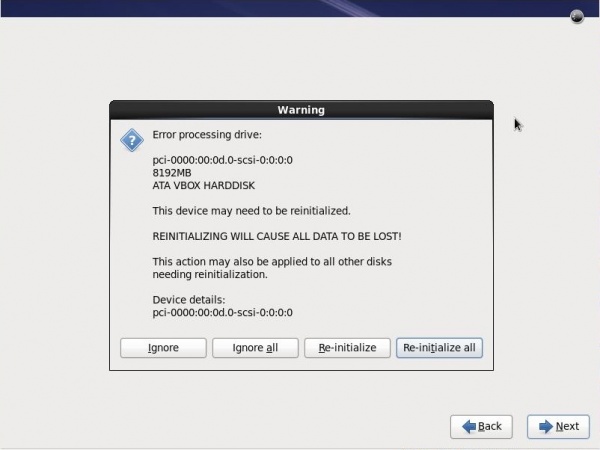
A rather scary dialog
(not my actual screenshot; this one courtesy of Máirín Duffy.)

Hitting the "Reinitialize All" button will allow the install to finish as expected, but it's still a manual action in a process that's trying to eliminate such.

Some bit of Google-fu later and asking questions on the #centos channel of irc.freenode.net (thanks, Wolfie!) pointed me to the correct option to set when clearing the disk partitions, and all should have been peachy-keen and wonderful from that point on. Except it wasn't, of course.

Tests conducted with two different versions each of three RHEL clones on my VMWare Fusion 3.1.3 system all failed with a mysterious "cannot read repodata" fatal error being thrown by the installer.

Except, of course, that mounting the DVDs in question and browsing them showed the /repodata directory and contents exactly as they should be. Fast-forward through a day of flailing and fuzzing different options "just to see what happens", and you have a classic yak shave.

So, knowing that I'll have to get the RHEL versions working eventually, and having been previously warned against using Chef-on-Ubuntu as a learning exercise, I'm now spinning up AutoYAST on openSUSE, which is (experientially) what I should have started with from the beginning.

The wall, where my head has banged against it repeatedly, can be repaired. The calendar? Time is the ultimate non-renewable resource.

(Anybody who has any suggestions for Making This Work with RHEL clones, ideally Scientific 6.1 and/or CentOS 6: enlightenment would be Greatly Appreciated.)

Wednesday, 20 July 2011

The Formerly Magical Trackpad

My Apple Magic Trackpad died tonight, aged less than six months, after a week-long illness. Numerous battery transplants, resets and reboots were unable to revive the patient. In lieu of flowers, donations to its replacement are now being gratefully accepted.

Whiskey. Tango. Fox?

Hardware — any hardware, but especially Apple kit — isn't supposed to die after mere months of daily use. I expect better from systems, and especially from Apple. Were I anywhere else on the planet besides Second World Singapore, I would have a reasonable degree of confidence that those expectations would be fulfilled. PAPaganda notwithstanding, this is the Potemkin city where having the highest-paid politicians on the planet doesn't mean that products or services (beyond political control-related security "services") are up to the same levels as would be expected in, say, Tanzania.

So I'm back to using the mouse that I'd been using for nearly two years before buying the Trackpad. With the wheel and five buttons (that I know of), it's certainly adequate for most ordinary-user or Web-developer tasks in Snow Leopard.

But trackpads are The Future™, a reality emphasised by the new OS X 10.7 "Lion" release, and by what's rumoured for Windows 8. While mice are comfortable and familiar to essentially everyone who's used a Mac in the last 27 years, or Windows PC in the last 15 or so, there are actions and gestures that the trackpad is simply a more natural fit for, and to which a trackpad user's "muscle memory" rapidly adapts. Going back to the mouse feels both familiar and foreign, not unlike attempting to ride a bicycle for the first time in thirty years (another recent experience).

So, I'll probably buy a replacement trackpad fairly soon. That is, if I can stay online long enough to get useful work done; we've had intermittent failures in the DSL service here of late. (Or am I allowed to say "intermittent successful access"? This is Second World Singapore, a family-run company town that dislikes any attention paid to the clay feet of its mighty statuary (and I'm not dissing the Merlion here).

Sigh.

Monday, 25 April 2011

The App Store: I Get It, but...hmmmmm...

Apple's "post-PC," "new media" iDevices are selling quite nicely, thank you. Millions of people have become enthusiastic, loyal, even evangelistic customers without ever clicking a mouse on an Apple desktop or laptop computer. Given that Apple's profit from a laptop or desktop computer is several times what it is for an iDevice, it's almost imperative for them to find ways to make the Mac desktop/laptop user experience support the traits that have been most successful on iDevices. This includes, especially, the App Store.

Fans of the App Store, either on the iDevices or the Mac, point to the fact that you can have several different devices (iPad/iPhone, iMac/MacBook) using the same Apple ID, and thus can install "content" that you "purchase" on several devices; all you need to do is register them under the same ID.

But the Mac, historically, has had a rather different model. You would (and still can, fortunately; at least for now) either purchase a disk with software on it, or download a "disk image;" a file which appeared to Mac OS to be a disk. As soon as you did that, a window would open with the program icon in it and an icon for your Applications folder, and you'd drag the icon over onto the folder. The software would be copied to your hard disk, and you'd be able to then run it like any other program. Want to uninstall the program? Drag its icon to the trash.

Another benefit of that latter model is that you have actual media — either physical or virtual — which you can use to reinstall the program on your computer or, license permitting, on other computers you personally or corporately own. You're very aware during the "normal" installation process that you're working with some sort of artefact which contains the program you're installing. That artefact either is or tries reasonably successful to simulate a physical object.

We've built up certain expectations about physical objects. They exist; though they can be destroyed, they don't generally disappear without direct action by you or another person. With very few exceptions, they can be used more than once. These and other expected traits give the object some value — economic, sentimental or otherwise.

The App Store for the Mac does away with the artefact; it replaces it with an abstraction that's not "real" in any sense you can point to afterwards. To a degree that some find disturbing, it turns the product with which you previously dealt into a service. That service can become unavailable for any number of reasons, not all of which are necessarily a result of your actions or intent.

Put another way, it turns the old "software as a product" notion, and in particular the notion of free software, on their heads. Most free software licenses (try to) make clear that the user is In Charge of his or her own system, including use of the software being licensed. The copyright holder retains certain rights, but yields the remainder to the user under conditions designed to make sure that the software remains "free" in the sense that it was originally licensed. The user may examine the software, redistribute it as he got it, (under most FSF-approved licenses) can create modified or derivative works so long as they are licensed compatibly to the original, and so on. Above all else, the user has the unquestioned right to make as many backup copies of the software as desired in case the original installation becomes unavailable (hard disk crash, extreme weather event, etc.) The user has rights, and has the means to safeguard those rights by virtue of the fact that he has a physical copy of the software in its original, usable form.

The App Store says "Mr User, you don't have to worry your pretty little head with any of that. You just point-and-click your way through the store, and when you check out, the software will be installed automatically on your system." That's great — so far as it goes. But there's no option, at least none that I have yet found, to retain a copy of the disk-image file(s) for the software you just licensed. If your drive goes south for the winter and doesn't come back, you "just" replace the drive, reinstall Mac OS X and install all your apps from the App Store.

That's fine for small programs, especially if you have a high-speed Internet connection using a properly managed ISP. But, unlike the App Store for iDevices, several programs licensed through the App Store for the Mac are in the hundreds-of-megabytes-to-gigabytes range. Try downloading Xcode 4 on a 128K ISDN line. And iLife. And iWork. And... you see the problem. Wouldn't it be much better if you at least had the option to manage all that locally, yourself, the way it's traditionally been for the Mac? And that doesn't even take into account Apple's well-documented "control-freakery," where software available one day — or even already installed on your system — may not be available the next. Even if we give Apple the benefit of all doubt, ascribing to them motives as pure as the driven snow, there's still a real problem here.

The iTunes Music Store has now moved away from "protected" DRM-encumbered music, because customers made it clear that they wouldn't stand for the inconvenience and loss of control over product that they had paid for. I can back up my iTunes library however I wish, and be reasonably confident that should anything happen to my Mac, I'll be able to restore the library on my new replacement Mac without downloading it all again from the ITMS.

Why can't I have that same confidence with the software products I license through the App Store? Apple aren't the only ones who think they should have a fair amount of control over "their" "stuff."

Comments?

Thursday, 14 April 2011

A Blessing is ALWAYS A Curse (and Vice Versa)

I've recently started as Senior Architect at Savant Degrees, a Singapore-based Web consultancy. Quite often, I feel like my job is as much "Senior Curmudgeon" as anything. According to Wiktionary.org, a curmudgeon is "[a]n ill-tempered (and frequently old) person full of stubborn ideas or opinions." I'm undoubtedly the oldest person among any of my colleagues that I've met, and I was told fairly explicitly that I was being hired on the basis of the variety and depth of my experience — i.e., for my ideas and opinions. And, like most people, I think I'm only stubborn when I'm right.

Naturally enough, I'm doing a lot of learning, too. This is my first experience with Groovy, a nicely dynamic language which runs atop the Java VM. Like any language worth its weight, a rich ecosystem is growing around it. Like the ecosystems around most languages, there is at least one ultra-massive tool that takes new folk some time to wrap their minds around. With PHP, for instance, it's the Zend Framework, which arguably makes the C++ Standard Library look minimalistic. With Java, it's pretty much anything having to do with J2EE1 (to which Groovy itself is a reaction).

The biggest tool I've yet stubbed my toe on in the Groovy world is, unquestionably, Gradle2. In the grand Zend tradition, the PDF version of the user guide is nearly 300 pages long and, also like Zend, is considerably out-of-date. It's considerably easier to argue that Gradle justifies the bulk, however, since Gradle is a "let's build anything" build manager/dependency tracker/dessert topping/floor wax. The basics can be understood in half a day, even if you've only nodding familiarity with Groovy3. To truly master it, however, requires significant extra time — as much as you feel you derive benefit from.

And that (finally) brings me to the point of this post. The group I'm working with now has some very talented and moderately experienced developers in it; they're open to new ideas and new ways of doing things, more than is the local cultural norm. In our craft, that's not just a Good Thing™; it's necessary for continuing success4. But that enthusiasm is tempered by a keen consciousness of impending deadlines, particularly the "curse of success;" a month, later this year, when we will be spread extremely thin amongst several important projects. The ways we've done things have been successful, but we see the down-sides of success as well.

So, new ways of doing things, and the hope of new, increasing success. New things like continuous integration using automated builds and unit tests, among other such recently-popular tools and techniques. (They're popular because they generally work better than Ye Olde Ways.) I'm arguing for the team to use tools that will, at the click of a button or the tick of the clock, automatically check out, build, test and package the code and associated resources for our project. The team is new to this, having used "traditional" "waterfall" processes in the past. Knowing one is to be hanged, as Mark Twain said, tends to focus the mind wonderfully; a rational person (or team) will avoid being put in that position. My job, so to speak, is to make the tools that help us cut the hangman's rope, and teach their use. Presenting already-busy people with several hundred pages of documentation is probably not the most effective way to do that.

So, at the moment, the most pressing blessing is that we have such wonderful tools available, with more on the way. Most categories of tools have several at-least-usable alternatives available; it's very easy to go into information overload. When that happens, often you just choose to use what some exemplar, say a tool vendor, use themselves. It becomes tragically ironic when a development group pursuing a more agile process has their agility and effectiveness limited by their "agile" tools. (I don't mean to be commenting on any specific company or team here; I've seen this effect on numerous projects over the years.)

Choosing deliberately increases the odds that you will choose wisely, and those odds will increase along with your experience. Experience is perhaps the ultimate professional blessing-and-curse-combined; "you never learn anything from doing it right the first time." I prefer the Nietzsche:

That which does not kill you, makes you stronger.

We're not dead yet — so we must be strong, yes? Another "stubborn idea and opinion."

Comments?

Footnotes:

1. Now known as JEE, because "Java 2" (1.2) is so last decade; we're on 1.6 now. (Return)

2. No, I haven't looked at Grails yet. Being a close of Ruby on Rails, I expect that to be the proverbial "kitchen sink with subdivisions attached." Fortunately (?), we're a Tomcat shop. (Return)

3. But, of course, experience counts; Gradle rewards your groovy Groovy skills with more efficiently expressive power in your project automation. (Return)

4. There's another curmudgeonly opinion for you. (Return)

Tuesday, 4 January 2011

Windows? Check. Skype? Check. Quality? Oops…

Several cultures share variations of a proverb which reminds us that you cannot build a house on sand and have it endure the test of time — or even the next tide.

Skype learned that the hard way a couple of weeks ago. Like all peer-to-peer, or P2P, networks, Skype relies on (a varying subset of) its users' systems to handle routine network-housekeeping chores, including routing. Fine; that's the way many applications have done things for more than a decade. Skype have been living unusually close to the edge in two respects: they have an unusually large, widely-distributed number of simultaneous users relative to other P2P networks, and it implicitly trusts the reliability of its Windows-based application and the underlying Windows operating system when performing at any needed scale. This is what sent the waves crashing in upon the sand-borne house.

Microsoft Windows is, inarguably, a wildly successful software system; along with Microsoft's Office set of applications, it is the basis of Microsoft's billions of dollars a year in revenue and profit. But just because something is successful or because it's made by a major corporation doesn't necessarily mean it's well-designed or -built. (See, for example, the Ford Pinto.)

By relying on the (always-questionable) stability and reliability of each of the Windows PCs acting as a "supernode" in its network architecture, Skype was setting itself on a path to eventual inevitable, foreseeable large-scale failure.

Many of the well-known problems with keeping Windows stable and running properly have to do with the ridiculous ease of developing, distributing and using malware; in some countries (such as Singapore), estimated infection rates of Internet-connected Windows PCs routinely hit or exceed 90%. Besides the obvious threat to any "secure" information on those systems (credit card info, login IDs, and so on), those infected Windows systems have a relatively large share of their processing power diverted for the benefit of someone other than the legitimate user or of applications other than those that s/he has authorised.

Another cause of instability and other problems, as with the Skype outage, is that it is very difficult to develop, deploy and maintain even moderately complex applications under Windows with any real means of asserting that the software is reliable and robust. The only way to gain any such real assurance is by testing as many hardware and software combinations with your software as you can, and hoping that you've found all the "most likely" problems. (This is why Microsoft and others employ thousands of software testers, in addition to a massive automated-testing infrastructure.) And, though Microsoft have made some relatively amazing improvements in this area (compare, say, Windows 98 to Windows 7), even they can't catch everything — and their development process and system architecture essentially require them to. Every Windows usee in the last 25 years has seen the "Blue Screen of Death;" that is merely an acknowledgement by Windows that it's completely lost its mind, usually after innumerable random acts of lesser senility.

Skype were bitten by both ends of this issue: a new release of their client application for Windows had defects that were not caught during development or internal testing, and by deploying that defective application on an operating system that provides little-to-no protection against maliciously or inadvertently defective applications, a large "time bomb" started ticking away, unnoticed by all until its spectacular detonation on or around 22 December 2010.

For a Skype client to be a "supernode," it cannot be behind a "firewall" that uses network address translation to isolate its clients from the big, bad Net. (There are ways around that, too, of course; but they're generally very black-hat techniques that don't scale well on a commercial basis.) A client does not have to be running on Windows to be a supernode, but given the demographics of Skype's user base, and the larger PC user base in general, the majority are.

And so, when Skype's defective Windows client ran into mortal difficulties on Windows' defective platform, the ordinary user PCs that were acting as supernodes started dropping like flies. Other Skype clients, as with any proper P2P network, simply rerouted to other supernodes. However, since many (if not most) of the Windows clients were behind NAT firewalls and there were (and are) a relatively small percentage of non-Windows clients available to serve as supernodes, the number of "leaf node" clients chasing the decreasing number of supernodes put the remaining systems under an unsustainable load, and so those Skype clients (with their supernode capabilities) dropped off the network.

Had there been a more heterogenous mix of Skype clients so that those available to perform supernode duties were not almost exclusively Windows PCs, the failure might well have been mitigated if not eliminated altogether. Or, were it practical to develop a (reasonably) guaranteed-stable application on Windows, the defect that initiated the failure cascade might well never have occurred. But by "putting all their eggs in one basket" which was known to have large, gaping holes in it, Skype were guaranteeing that their metaphorical sidewalk would eventually be covered hip-deep in broken eggs.

Monocultures in technology, as in farming, are generally Bad Things; a threat which can attack any member of a monoculture can attack all such members. (Think of the Windows malware-infection rates as an example of this.) Single points of commonality (or of control) are always eventual single points of failure.

The Skype failure could well have been a reminder of these long-known basic truths. The commercial interests involved, however, ensure that such a lesson will go unheeded. It will therefore be repeated; very possibly not with Skype, but with some other aspect of our grossly defective information-technology ecosystem. Think of it as "Unsafe at Any Speed" meeting Groundhog Day until something is done to prevent yet another China Syndrome.

Tuesday, 21 December 2010

Keywords (aka "tags") ARE NOT Structure

And I understand that's the whole point. But sometimes, you're dealing with a concept or with data that is most naturally and properly organised in a structured hierarchy. While keywords1 are a very convenient tool for filtering ad hoc queries2, they're a poor stand-in for truly structured information.

One (possibly trivial) case in point: managing your browser bookmarks. What I want to be able to do is to organise bookmarks3 and be able to view them in the hierarchy and order that they will be in in the browser "Bookmarks" menu. That way, regardless of which file format4 is being imported from or exported to, while you're using the bookmark manager, you have an accurate view of how the ("folder"-based) organisation of the bookmarks will appear in your browser.

So why not, as several managers do, use keywords to imply structure? Let's take a look at that idea, with a scenario. Let's say you have 4,000-5,000 bookmarks in a fairly deep and wide hierarchy of about 800 folders, some nested five and six levels from the root. While that may sound like a 1996-era Yahoo!, that's roughly what I deal with, and I know quite a few long-time Web users who have significantly more.

OK, so you're going to do your internal organisation using keywords. You're a Web developer, so you might have a few bookmarks in a folder with the path Development/Web Development/PHP/Frameworks/Agavi. Each bookmark's reference in the bookmark-manager software would have the keywords Development, Web Development, PHP, and so on. It clutters up the keyword list, and it necessarily complicates the display and editing of those bookmarks within the software. It also means that more data is stored for each and every bookmark. Disk drives are cheaper than they have ever before been, but they're not free.

And, what's worse, if you accidentally (or otherwise) delete one of the keywords from one of the bookmarks, when you export your list again, that bookmark will be in a brand-new folder somewhere else in the hierarchy. Finding and fixing that, if you have a reasonably complex bookmark list, can be difficult. If you don't find and fix it, of course, then it won't be there when you go looking in what should be the right place.

And finally, you're twisting the whole structure of the way people (and browsers) view bookmarks; you're distorting the semantics of the system. This may seem a fine point in today's "get-it-done-yesterday!" way of doing everything. It's not. By not having a clean, self-consistent, efficient conceptual organisation for your software, you make it more difficult to learn, more difficult to use, more complex to develop, more expensive to maintain, and more likely to have more severe problems over the lifetime of the software5.

One final mental exercise. Think of that CD collection I alluded to at the beginning of this post, that's now stored on your computer using whatever music player you like. If I delete the Wakeup Music keyword from the track info for "Come Fly With Me," and then I play the album, nothing has changed. That's metadata. But if I change the bit-rate of the recording, or move the track into the folder for the album "My Way," that's different, isn't it? That's a change to the data, or to the organisation of the data. One is a matter of choice; the other is a matter of history.

By conflating data and metadata (literally, "data about data,") we do a disservice to both.

And now, if either of you happen to know of a (preferably not browser-based) bookmark manager that does things The Right Way™ — or reasonably close to it — I'm all ears.

Thanks for reading, and replying.

Footnotes

1. Though they're popularly called "tags" by all the Kool Kids™ these days, and "Labels" here on Blogger, I'm going to refer to the data items as "keywords" because that's what the library- and information-sciences worlds call them, as well as any programmer who started his Craft before, oh, about 1995. (Return)

2. "List all my Frank Sinatra album CD titles that I've tagged as Wakeup Music." (Return)

3. Each "bookmark" should store URL and page title at an absolute minimum; keywords are good to have; additional metadata optional. (Return)

4. XBEL, OPML, LSMFTML, or whatever the new "standard" is next month. (This would be a good feature to think about some sort of plugin architecture for.) (Return)

5. Look at practically any Windows program for examples of this, or, better, any three Windows programs together. It's not that they don't work, but after a few hours of use you can think of several ways that each could be more consistent with itself and with others. (Return)

Wednesday, 20 October 2010

It's Not Lucid For Me Anymore

For those of you a bit limited in your English knowledge, lucid means "easily understood; completely intelligible or comprehensible."

My experience bringing up some Web servers on the latest release of Ubuntu Linux, release 10.10 aka "Maverick Meerkat" (replacing 10.04, "Lucid Lynx") left me feeling scalped by Apache (the Web server software).

It's (usually) quite straightforward to bring up a Web site in a server's main document root directory, the system-wide, (hopefully) secured directory that Apache loads files from when you browse a simple Web URL such as http://www.example.com/.

Many modern Web sites, and the tools used to build them, depend heavily on Apache's mod_rewrite module, which takes the URL requested by your browser and "rewrites" it into something quite different for security purposes and/or to enable various Web application frameworks to function. Your browser's request for http://www.example.com/ may be presented to the server as if you'd typed http://server1.example.com/webapps/whatever/index.php&node=1. All this is transparent FM to you and, more importantly, to the search engines (Google and friends).

OK, fine. Anybody who's been doing Web work at all knows this. If you've used the Web server on your own system (Apache comes standard with every Apple Mac or Linux system; you Windows usees will have to do it for/to yourselves). The ''mod_rewrite'' syntax makes "arcane" a laughable understatement, but again, no biggie. If you're using just about any framework, it comes with (or documents how to create) the configuration file needed, which generally requires minimal-to-no twiddling from you. Again, as long as you're working at the system document root.

What will send you on a magical voyage of discovery, or an extreme bout of Google-fu, is if you're not working at the system root. Maybe you've got more than one Web site or app you're hosting on a single server (generally using "virtual hosts". More likely, you want to be able to serve a Web page or site from your own user-level directory. Apache has a module for that, too; it's called mod_userdir. And as long as you're dealing with static Web pages, it's drop-dead simple. That makes sense; Apache has been around quite nearly as long as the Web has; all the easy problems and most of the reasonably hard ones have long been solved by now.

As you can probably guess from the build-up here, mixing all the above ingredients (Apache, a framework, mod_rewrite and mod_userdir is a fairly reliable way to ensure that "hilarity ensues". This is so not so much because the combination inherently poses challenges (reasonable experienced developers may differ on that), but because the interaction is quite often (read: until and unless decisively proven otherwise) platform-specific. By "platform-specific," I mean "virtually certain to differ between various distributions of Linux, not to mention Mac OS X, BSD Unix (FreeBSD, OpenBSD, etc.) and Windows."

You may have made it all work on a dozen systems before, only to find that the next system you try displays the performance characteristics of an in-process actuation of an IED. You'll flail around, you'll feel like a "stupid newbie," you'll get on IRC and pound on Google. And sooner or later, because you are a stubborn SOB (aren't you?), you'll find (situation-specific) Enlightenment.

And so, I wish to announce my heart-felt thanks to user FRuso on the Ubuntu user forums who posted this response to The Question. It's a different answer than for openSUSE or Fedora, and please don't do this to an OS X system. But if you're one of the Teeming Millions™ (well, Hundreds, anyway) trudging down this well-worn trail and you're trying to make Ubuntu work, this will help out.

Because, after all, if every similar platform worked the same way, people might actually get work done. If it was that easy, ordinary Joe-Sixpack users might start setting up their own servers, instead of relying on corporate-sanctioned and -supported hosting providers to centralise everything. And then, people might actually exchange ideas and grow their minds a bit! Who knows?

Ahhh, it's "the Internet" (actually, the Web). Most people don't care, as long as they can view the latest bread and circuses on YouTube or Hulu.

Tuesday, 5 October 2010

Redundancy is Repetitive, Inefficient and Counterproductive

But you already know that.

I've long been a supporter of free and open source software, even contributing to a few projects. However, my enthusiasm has cooled a bit in the last several years, as the time I've been able to devote to such projects has both dwindled and been divided among more projects.

I'm continually flabbergasted by the number of open-source projects that cover the same ground, ad infinitum, often with little to no apparent differentiation between them. By continually "reinventing the same wheel," these small projects usually manage to put out a small number of alpha- or beta-quality releases, and then cease to make visible progress. This could be because the original developer(s) became frustrated or distracted; because the project succumbed to internal politics (a leading cause of FLOSS project death); or merely because the developer(s) realised that they were deep in the rut of a path that has been travelled many, many times before.

This flash of obviousness came about as I've been researching and evaluating PHP frameworks for Web development. I've been developing and maintaining sites using a couple of these, notably Kohana 2.3, but for various reasons have been reluctant to make the switch to the now-current 3.0 release. I decided to do a relatively formal, structured evaluation of several of the frameworks out there, rather than just pounce on the first I came across that looked "reasonable." (Silly me, but oh well.) Of course, as my list of frameworks to look at grew from six, to twenty, to considerably more, I became uncomfortable; torn between the reality that I'm doing this all myself (and devoting significantly less than 100% time to the endeavour), but at the same time wanting to remain open to pleasant surprises. After all, "pleasant surprises" were how I stumbled upon Kohana in the first place, and though I am strongly considering using another tool in its place (again, for non-technical reasons), contributing to a megalithic monoculture is not my idea of "adding value."

Today I did something that I should have done a week or two ago: I went out to SourceForge and got a list of all the PHP frameworks registered on the site.

Oh, my effing $DEITY! "Searching gives 1316 results."

Obviously, not all of those are appropriate (there are numerous reinventions of the CMS wheel, for instance); many can be filtered simply because they haven't published updates recently enough to meet my criteria, and so on, but that's all rather beside my current point.

Open-source projects are (in)famously both insular and prolific, leading to the kind of nonsense I ran into on SourceForge. Commercial products have a built-in inhibitor of this particular pathology: if a market gets divided among so many competitors that nobody can cover their costs, then in very short order the existing products will either consolidate into fewer, more sustainable alternatives or die altogether. Open-source projects, particularly those started by people inexperienced in such projects, fail to realise that they too are competing for resources just as much as their commercial brethren. In the FLOSS case, the finite, competed-for resource is time, both of (potential) contributors and of passive users (what the commercial world calls "customers").

Some open-source projects recognise this. In the Linux and Unix/BSD desktop worlds, the "market" for desktop managers (that provide the windows, icons, menus, and so on that are the UI to the user) has been dominated by two projects, KDE and GNOME. Though there are other choices with solid offerings and active communities, a developer can choose to develop for either KDE or GNOME with the confidence that virtually anyone in his target audience will be able to run his software on their system of choice. Consequently, most projects that have to make a choice, choose KDE or GNOME.

The Web is a different beast entirely, and while standards are for the most part very well-defined, the "barrier to entry" for those seeking to do things (allegedly) differently is very low. Some in the PHP Web development community advise new developers to tackle creating their own framework, as a learning tool. I suspect that that's how many of the SourceForge listings originated. I also happen to think that the advice itself is naïve, akin to a new auto mechanic being advised to build his own engine to gain a better understanding of those from Toyota or Ford. What I would recommend instead is that a new developer learn one or two of the more widely-used frameworks, browse around for another two or three that seem interesting, and start contributing to the project(s) of her choice. Virtually all such projects recognise their need for more help, as well as the fact that "we were all newbies once."

Consolidation in the PHP-framework field, while maintaining the low barrier to entry, should be a Good Thing™: to a greater degree than commercial products, FLOSS projects should succeed on their merits, technical and otherwise. As more developers join a well-run project community, the project's software should continue to both improve and find wider user/customer use. The ability to "do your own thing" should be kept, if only as a check against the use of marketing hype over technical merit.

But I believe that relatively small, informal "A- and B-List" groups of selections would be good for projects and developers (and developers' clients); a lot of what I've come across in the last few days would be on my "P-List," if not "ZZZZ."

Oh yeah, by the way: this sort of maturation and shared effort would do wonders for our Craft's progress towards true professional status. Any of us who've had our schedules and budgets tinkered with by people who admit they know nothing of what we do should understand the desirability of that goal. Given the degree to which software permeates public life and policy, that "desirability" has become a dire necessity; it's just more expedient for people to pretend that isn't really the case. Stuxnet, anyone?

Tuesday, 28 September 2010

IE9 and Standards? Nothing to see here, folks; move along...

This is a re-post of a comment I left to the post "HTML5 Support in Internet Explorer 9 on Louis Lazaris' Impressive Webs blog (which I highly recommend for people working in or interested in Web development). I've slightly edited a few places for clarity. The comments that had been left by people were almost universally complaining about Microsoft in general and IE's continuing history of imperfect-at-best compliance with either-you-do-or-you-might-as-well-not-try standards. Having worked in and with Microsoft on several occasions, and being active in a number of open-source projects besides, I have a slightly different view, as I state below. Thanks for reading.


Actually, I'm amazed that it's progressed as much as it has.

Let me be clear; I'm not in any way praising IE; the industry as a whole needs to bury it — decisively, irretrievably and imminently. We as development professionals need to have the professional self-respect to tell current and potential clients, "We develop to current Web standards that are supported across various browsers and platforms. To the degree that any particular release of Microsoft Internet Exploder supports the markup, styling and behaviour of any particular site, that's well and good. However, without monumental additional time and budget resources, no attempt will be made to provide IE support when those resources could instead be used to improve the experience for users of modern browsers."

I firmly believe that IE hasn't progressed as far as, say, Chromium, can be laid firmly at the feet of Microsoft's existing code base. Microsoft's developers and managers are fully experienced with the reality that complete green-field rewrites of existing projects almost never succeed. They've got a code base where the list of major Windows modules and subsystems that do not have dependency relationships with IE could be read aloud comfortably in a single breath. That was done initially by choice; now, it doesn't matter how well-meaning the intentions or competent the team are, they have to live with the codebase they have. It's all legacy code. The developers at Microsoft are (with rare exception) not morons, but living in the sewer while they're trying to make something that can stand next to the shiny new browsers next door has to be a psychologically toxic exercise. Their baby is blowing up the Web left and right; they know it, and they know they can't do a damned thing about it without staging a coup d'état, replacing dozens of levels of management and senior executives and fundamentally changing the culture of the organisation. Don't hold your breath waiting for that to happen.

That isn't sour grapes or a diss against the IE developers; it's simple reality. Microsoft do some amazing things — just not so much for (or on) Windows. Unfortunately for all of us, Windows and Office for Windows are the herds of cash cows for Microsoft, and anything that could be seen as even potentially disrupting that would get shot down faster than you can say S-E-C; the investors would never stand for it. And, with the system and the rules the way they are, they'd be perfectly right. Innovation isn't as important to the bean-counters (or the regulators) as "maintaining and enhancing shareholder value," and MSFT have had enough problems with that lately. (Just compare their share values to, say, AAPL over the last ten years.) Doing anything "risky" is simply politically (and legally, really) impossible.

So, no matter how many times the IE team jump up and down and say "look at all our neat new features," without mentioning the standard features left unimplemented because they pulled off numerous miracles just making what they have work, the response has to be "nothing to see here, folks; move along."

And move along we shall.

Don't Waste My Time.

What follows is a critique and a complaint, not a rant. What's the difference, you ask? A rant, in my view, is a primal scream of frustration and near-impotent rage that often doesn't let a few (allegedly) non-essential facts get in the way of a good thrashing. It also takes far more energy than I'm able to summon at present, for reasons that may become clear below.


As I've mentioned previously, I've been kicking the tires on the (relatively new) Kohana 3.0 application framework for PHP Web development. I'd previously used (and enthused about) the 2.3.x ("KO2") release; I was itching to get my hands dirty with 3.0.1 After a couple of dozen hours spent plinking away at it, however, I'm reevaluating my choices.

Two of the things that endeared the earlier system to me were the good-to-excellent, copious documentation and the active, always-willing-to-help user community (which, quite frankly, are the backbones of any open-source project).

KO3 is a different proposition entirely than KO2. As I write this, the eighth bug-fix update to 3.0 is available on the Web site. Since this is a new "the same, but different" project, all the users are starting fresh, so there can't be the same level of everyone-helps-everyone-else camaraderie as with KO2. This puts a foreseeable, far greater burden on the documentation to help people get productive as quickly and effectively as possible. However, the documentation, quite charitably, remains in a beta-quality state. This is true in comparison to both the earlier release and to other PHP Web frameworks such as Symfony2, CakePHP, FLOW3 and (notoriously) Zend. With most of these other frameworks, as with KO2, it was a quick, straightforward process figuring out how to get from the "hello-world" style demos, to being able to create a useful-but-simple site, to branching out from there. It's taken four times longer to get half as far with KO3 as with KO2.

Judging by comments in the Kohana support forums, I'm not alone in this; the documentation has been roundly panned by virtually all users who've bothered to comment. There's been far too much defensive "no, it isn't bad, you just need to read a bit more, and use the source, Luke" attitude from the project folks. During the KO2 lifecycle, the attitude I understood from their responses was more along the lines of "we know there are a few problems; we're working on them," quickly followed by "take a look at this." I don't know if 3.0 is so much more complex than 2.x that they simply don't have the bandwidth to document things to their previous standards. Frankly, I don't care any more.

I've decided that my existing projects that have been started in Kohana 2.3 will remain there; possibly moving to 2.4 when it becomes the officially-supported release. But I do not plan to invest any more time and effort into Kohana 3.0, at least until the new project has had some time to mature. I fully recognise the potentially self-defeating attitude inherent in that viewpoint. Virtually any open-source project depends on its community to "plug the holes" that the "official" project maintainers don't have time for or deliberately leave as open questions for the community. Well-run community projects are extremely collaborative, communication-rich environments.

Other projects take a "vendor/product" approach, essentially saying "Here's everything you'll need, soup-to-nuts; we'd really appreciate it if you built around the edges and took things deeper in your direction of interest, but the core that we're responsible for is solid." Those "vendors", the Zends and Sensio Labs of the world, have rich open-source offerings that they use as a platform to build (or offer) what actually pays the bills.

While I have a strong philosophical and experiential preference for community-driven (or at least -oriented) projects, there have to be times when I just want to Get Things Done rather than embark on an endless voyage of discovery.3 It is at those times that I'll reach for something that "just works" well enough for me to accomplish whatever it is I'm trying to do at the moment, whether it's to write a book or to bring up a client's Web site. I know and accept that any new tool, or new version of a tool I've used previously, will require a certain amount of time to "get up to speed" on. I don't know everything (or necessarily anything) before I learn it; the most I can hope for (and what I really do insist on) is that things make sense within the logical and semantic frameworks4 that they're expressed in, and that that expression is accessible, complete and correct enough that I can feel like I'm making progress. This invariably involves some sort of documentation; whether a "conventional" or online manual, a Wiki, or a user forum; the format is less important to me than the attributes I mentioned earlier.

Kohana 3.0, as it currently stands, does not meet that standard for me. And so I'm back in a feverish learn-and-evaluate mode with at least two other frameworks. I have projects to finish, and I have several chapters of a book I'm working on that had initially been written around Kohana 2, and will now need to be substantially redone.5

I intend to give each of those new candidate frameworks the same amount of time that it took me to get productive in Kohana 2.x (which was significantly less than the "industry leader," as I've previously mentioned). This is going to be an interesting week and a half or so, in the Chinese-curse sense of the word.

Footnotes:

1. Technical reasons for moving to KO3 included the switch from a model-view-controller (MVC) architecture to hierarchical MVC (or HMVC); if you know what these mean, you should know this is a Very Big Deal™. Additionally, I've found it a Very Bad Thing to tie myself to a legacy (obsolescent) project, and the end of KO2 is being made very plain on the Kohana Web site.(Return)

2. If the new, pre-release Symfony 2 code is as good as the documentation, we're in for a real treat.

3. I am typing this on a Mac rather than a Linux box, after all (though I have three Linux VMs running at the moment).(Return)

4. This implies, of course, that there are "logical and semantic frameworks" sufficiently visible, understandable and relevant to the task at hand. (Return)

5. I certainly don't want to fall into the same trap as a previous series of PHP books, which relied on the obsolete and inadequate Ulysses framework. Ulysses has been justly and productively panned, which has to reflect poorly on the aforementioned book (which I happen to own) and its authors. (Return)

Tuesday, 14 September 2010

Saving Effort and Time is Hard Work

As both my regular readers well know, I've been using a couple of Macs1 as my main systems for some time now. As many (if not most, these days) Web developers do, I run different systems (Windows and a raft of Linuxes) using VMWare Fusion so that I can do various testing activities.

Many Linux distributions come with some form of automation support for installation and updates2. Several of these use the (generally excellent) Red Hat Anaconda installer and its automation scheme, Kickstart. Red Hat and the user community offer copious, free documentation to help the new-to-automation system administrator get started.

If you're doing a relatively plain-vanilla installation, this is trivially easy. After installing a new Fedora system (image), for example, there is a file named anaconda-ks.cfg in the root user's home directory, which can be used to either replay the just-completed installation or as a basis for further customisation. To reuse, save the file to a USB key or to a suitable location on your local network, and you can replay the installation at will.

Customising the installation further, naturally, takes significant additional effort — almost as "significant" as the effort required to do the same level of customisation manually during installation. The saving grace, of course, is that this only needs to be done once for a given version of a given distribution. Some relatively minor tinkering will be needed to move from one version to another (say, Fedora 13 to 14), and an unknowable-in-advance amount of effort needed to adapt the Kickstart configuration to a new, different distribution (such as Mandriva), since packages on offer as well as package names themselves can vary between distros3.

It's almost enough to make me pull both remaining hairs out. For several years, I have had a manual installation procedure for Fedora documented on my internal Wiki. That process, however, leaves something to be desired, mainly because it is an intermixture of manual steps and small shell scripts that install and configure various bits and pieces. Having a fire-and-forget system like Kickstart (that could then be adapted to other distributions as well), is an extremely seductive idea.

It doesn't help that the Kickstart Configurator on Fedora 13, which provides a (relatively) easy-to-use GUI for configuring and specifying the contents of a Kickstart configuration file, works inconsistently. Using the default GNOME desktop environment, one of my two Fedora VMs fails to display the application menu, which is used for tasks such as loading and saving configuration files. Under the alternate (for Fedora) KDE desktop, the menu appears and functions correctly.

One of the things I might get around to eventually is to write an alternative automated-installation-configuration utility. Being able to install a common set of packages across RPM-based (Red Hat-style) Linuxes such as Fedora, Mandriva and CentOS as well as Debian and its derivatives (like Ubuntu), and maybe one or two others besides, would be a Very Handy Thing to Have™.

That is, once I scavenge enough pet-project time to do it, of course. For now, it's back to the nuances of Kickstart.

Footnotes:

1. an iMac and a MacBook Pro. (Return)

2. Microsoft offer this for Windows, of course, but they only support Vista SP1, Windows 7 and Windows Server 2008. No XP. Oops. (Return)

3. Jargon. The term distro is commonly used by Linux professionals and enthusiasts as an abbreviation for "distribution"; a collection of GNU and other tools and applications built on top of the Linux kernel. (Return)

Thursday, 2 September 2010

Patterns and Anti-Patterns: Like Matter and Anti-Matter

Well, that's a few hours I'd like to have over again.

As both my regular readers know, I've long been a proponent of agile software development, particularly with respect to my current focus on Web development using PHP.

One tool that I, and frankly any PHP developer worth their salt, use is PHPUnit for unit testing, a central practice in what's called test-driven development or TDD. Essentially, TDD is just a bit of discipline that requires you to determine how you can prove that each new bit of code you write works properly — before writing that new code. By running the test before you write the new code, you can prove that the test fails... so that, when you write only the new code you intend, a passing test indicates that you've (quite likely) got it right.

At one point, I had a class I was writing (called Table) and its associated test class (TableTest). Once I got started, I could see that I would be writing a rather large series of tests in TableTest. If they remained joined in a single class, they would quickly grow quite long and repetitive, as several tests would verify small but crucial variations on common themes. So, I decided to do the "proper" thing and decompose the test class into smaller, more focused pieces, and have a common "parent" class manage all the things that were shared or common between them. Again, as anyone who's developed software knows, this has been a standard practice for several decades; it's ordinarily the matter of a few minutes' thought about how to go about it, and then a relatively uneventful series of test/code/revise iterations to make it happen.

What happened this afternoon was not "ordinary." I made an initial rewrite of the existing test class, making a base (or "parent") class which did most of the housekeeping detail and left the new subclass (or "child" class) with just the tests that had already been written and proven to work. (That's the key point here; I knew the tests passed when I'd been using a single test class, and no changes whatever were made to the code being tested. It couldn't have found new ways to fail.)

Every single test produced an error. "OK," I thought, "let's make the simplest possible two-class test code and poke around with that." Ten minutes later, a simplified parent class and a child class with a single test were producing the same error.

The simplified parent class can be seen on this page, and the simplified child class here. Anybody who knows PHP will likely look at the code and ask, "what's so hard about that?" The answer is, nothing — as far as the code itself goes.

What's happening, as the updated comments on pastebin make clear, is that there is a name collision between the ''data'' item declared as part of my TableTest class and an item of the same name declared as part of the parent of that class, PHPUnit's PHPUnit_Framework_TestCase.

In many programming languages, conflicts like this are detected and at least warned about by the interpreter or compiler (the program responsible for turning your source code into something the computer can understand). PHP doesn't do this, at least not as of the current version. There are occasions when being able to "clobber" existing data is a desirable thing; the PHPUnit manual even documents instances where that behaviour is necessary to test certain types of code. (I'd seen that in the manual before; but the significance didn't immediately strike me today.)

This has inspired me to write up a standard issue-resolution procedure to add to my own personal Wiki documenting such things. It will probably make it into the book I'm writing, too. Basically, whenever I run into a problem like this with PHPUnit or any other similar interpreted-PHP tool, I'll write tests which do nothing more than define, write to and read from any data items that I define in the code that has problems. Had I done that in the beginning today, I would have saved myself quite a lot of time.

Namely, the three hours it did take me to solve the problem, and the hour I've spent here venting about it.

Thanks for your patience. I'll have another, more intelligent, post along shortly. (That "more intelligent" part shouldn't be too difficult now, should it?)

Tuesday, 31 August 2010

My reaction to the new, pico-sized iPod Nano

This is the content of a comment I originally posted on ZDNet, in the Talkback section for the article New iPod Nano rumored to shrink further, by Jason D. O'Grady.


Cupertino, CA (1 April 2012) (UPI) Apple Inc (s AAPL) today introduced the new iPod Implant, which is to replace both the existing Nano and Shuffle models.

At the launch event at the now-traditional Yerba Buena Center, retiring Chairman Emeritus Steven P. Jobs announced that the new device would be available immediately. Roughly the size and shape of two typical breath mints, the newest iPod model is designed to be implanted next to the user's cochleas where, using very low-powered vibrations, it plays stereophonic music which the user hears in "perfectly detailed clarity," according to Mr. Jobs.

Apple announced a partnership with The Curanderismo Group, a nationwide chain of medical practitioners who have been designated as "preferred installers" of the new device. At the event, Dr. Yuri Gallyutsinogenov, President of the Group, explained, "Installing the iPod Implant is a simple surgical procedure, which nearly all our practitioner members are now trained in. For the low, low price of $199, a customer can buy the new device and have it implanted on the same day by our specialists."

Mr. Jobs was quick to clarify that the price quoted by Dr. Gallyutsinogenov was just for the installation procedure. The iPod Implant, available with storage capacities of 8, 16 and 32 gigabytes (GB), is priced from $199 to $399 for the device itself.

Tuesday, 17 August 2010

In Praise of Robust Tools and of The Future™

One of the best points about doing Web development in PHP is that it's so widely used; several respectable estimates by organizations that get paid to find these things out say that some varying number north of 50% of all sites on the World Wide Web use PHP as their implementation language. This includes numerous content management systems, or CMS, such as WordPress, Joomla! and Drupal.

One of the far-less-good points about doing Web development in PHP is that it's so widely used; the (evolving) "standard" set of tools, in true open-source fashion, are assembled and maintained by an ad-hoc band of individual and small-corporate luminaries, on infrastructure that worked just fine back when any given server was hit a couple of thousand times a year; by continuing to rely on (what to the outside Net appear to be) individual servers without terribly huge pipes connecting them to the larger Internet, the infrastructure completely fails when that's scaled up by a factor of a thousand or ten.

Web developers using PHP are highly dependent on an extension architecture/platform called PEAR, the "PHP Extension and Application Repository." Singular. Well, for any given extension or application, it's singular. So, as the user base scales upwards, popular tools that go through a vigorous release cycle, the servers they're hosted on (and network choke points between large subsets of users and those servers) start having reliability problems; transfers slow to a crawl, or fizzle out entirely. (One such transfer this evening proceeded at a sedate 600 bytes per second. Not kilobytes: bytes. That's 1980s dial-up speed.)

Developers in other languages have similar tools; Rubyists have gems available from sites like rubygems.org; Pythonistas have eggs. But somehow I hear a lot less grumbling, and do less of my own, when the subjects of gems or eggs come up; they seem to Just Work™ – which indicates that the network infrastructure is a lot more robust; either larger "pipes" and/or more, distributed servers such as with a CDN.

Trying to access servers like this from Second World cities like Singapore that apparently devote more resources to content filtering/monitoring than easing congestion doesn't help either. Hey, SingNet and M"D"A, how come it takes ten hops to get off an island that's barely that many miles across? If we want to plug Singapore into the "new global economy," having grotesquely under-resourced connections is not helpful.

But back to the main subject: If PHP is going to continue its phenomenally successful growth, then the infrastructure is going to have to decentralise, aggressively. Having essential tools like PEAR and the PHPUnit repository available only from a single point ensures that single points of failure will continue to seriously compromise the PHP ecosystem. No access to servers, no access to tools. No access to tools, then development of PHP artifacts with reasonable efficiency and economy is severely degraded.

In other words, the status quo is a limiting factor on future growth and success. However, as many will be quick to point out, building infrastructure costs money – for hardware, for connectivity, for the paid labour of skilled craftspeople and professionals to create, install, operate and maintain this enhanced infrastructure. No explicit means of funding such an endeavour presently exists, at least not to my knowledge.

So where do we go from here, PHP community?>

Monday, 16 August 2010

Proof Against Most Idiots

Fair warning: Geekish laudatory rant ahead. Still with me? Good!

I suppose it says something less than complimentary about our Craft that, when things actually work in a sensible fashion, recovering from Stupid User Actions™, it's surprising enough to be noteworthy. But I seriously doubt that I'm the only one who's noticed this.

Case in point: yesterday, I started downloading the Debian Linux testing-version DVDs. Yes, plural; there are 8 of them., as the standard software repository comes along with the test build. Anyway...

As most of us do, I was multitasking pretty heavily last night; when I knocked off, I just put my iMac to sleep as usual. It was long after I had gone to bed that I remembered, "hey, wasn't I downloading a passel of Linux DVDs when I slept the system?"

Expecting to have several "interesting" error messages displayed when I woke the system up (if in fact the file system hadn't been somehow damaged... yes, I was used by Windows for far too long), I powered up the system and was about to log in when BAM!... 15 minutes of phone calls. Thoroughly distracted afterwards, I log in, check my email, read a couple of new bug reports for a project I'm working on, and then remember "hey! everything's working!"

I switch to the Terminal window for the download (which was using GNU wget 1.12 if you care), to be greeted by the following display (excerpting):

--2010-08-15 19:45:15--  http://cdimage.debian.org/cdimage/weekly-builds/amd64/iso-dvd/debian-testing-amd64-DVD-6.iso
Resolving cdimage.debian.org (cdimage.debian.org)... 130.239.18.163, 130.239.18.173
Connecting to cdimage.debian.org (cdimage.debian.org)|130.239.18.163|:80... connected.
HTTP request sent, awaiting response... 302 Found
Location: http://caesar.acc.umu.se/cdimage/weekly-builds/amd64/iso-dvd/debian-testing-amd64-DVD-6.iso [following]
--2010-08-15 19:45:20--  http://caesar.acc.umu.se/cdimage/weekly-builds/amd64/iso-dvd/debian-testing-amd64-DVD-6.iso
Resolving caesar.acc.umu.se (caesar.acc.umu.se)... 2001:6b0:e:2018::142, 130.239.18.142
Connecting to caesar.acc.umu.se (caesar.acc.umu.se)|2001:6b0:e:2018::142|:80... failed: No route to host.
Connecting to caesar.acc.umu.se (caesar.acc.umu.se)|130.239.18.142|:80... connected.
HTTP request sent, awaiting response... 200 OK
Length: 4696719360 (4.4G) [application/octet-stream]
Saving to: “debian-testing-amd64-DVD-6.iso”

89% [===============================================================================================>           ] 4,214,102,016 --.-K/s   in 13h 40m 

2010-08-16 09:26:01 (83.6 KB/s) - Read error at byte 4214102016/4696719360 (Operation timed out). Retrying.

--2010-08-16 09:26:04--  (try: 2)  http://caesar.acc.umu.se/cdimage/weekly-builds/amd64/iso-dvd/debian-testing-amd64-DVD-6.iso
Connecting to caesar.acc.umu.se (caesar.acc.umu.se)|130.239.18.142|:80... connected.
HTTP request sent, awaiting response... 206 Partial Content
Length: 4696719360 (4.4G), 482617344 (460M) remaining [application/octet-stream]
Saving to: “debian-testing-amd64-DVD-6.iso”

100%[++++++++++++++++++++++++++++++++++++++++++++++++++++++++++++++++++++++++++++++++++++++++++++++++==========>] 4,696,719,360 1.26M/s   in 6m 26s  

2010-08-16 09:32:50 (1.19 MB/s) - “debian-testing-amd64-DVD-6.iso” saved [4696719360/4696719360]

Note the report of a read error at 09:26:04 on 2010-08-16. The software was complaining that it had to recover from a timeout. Yes, I'm sure ten hours or so significantly exceeds whatever timeout value had been coded into wget... but it never missed a beat (or a byte; the SHA1 checksum matched afterwards).

I'm including the obligatory "don't try this at home, kids!" warning... but, if you aren't sitting in front of Windows, isn't it nice to know you can?

Sunday, 15 August 2010

Where Do We "Go" From Here? D2 Or Not D2, That the Question Is

Unless you've been working in an organization whose mission is to supply C++ language tools (and perhaps particularly if you have, come to think of it), you can't help but have noticed that a lot of people who value productive use of time over esoteric language theory have come to the conclusion that the C++ language is hopelessly broken.

Sure, you can do anything in C++... or at least in C++ as specified. How you do it in any particular C++ implementation varies. That's a large part of the justification for libraries like the (excellent) Boost; to tame the wilderness and present a reasonable set of tools that will (almost certainly) work with any (serious) C++ compiler in the wild.

But, as several language professionals have pointed out, very, very few (if any) people know all there is to know about C++; teams using C++ for projects agree (explicitly or otherwise) on what features will and won't be used. Sometimes, as in the case of many FLOSS projects, this is because compiler support has historically been inconsistent across platforms; more generally, it's to keep the codebase within the reasonable capabilities of whatever teammates poke at it over the life of the project.

I've been using C++ for 20+ years now, and I still learn something — and find I've forgotten something — about C++ on every project I embark on. Talking with other, often very senior, developers indicates that this is by no means an isolated experience. Thus, the quest for other language(s) that can be used in all or most of the numerous areas in which C++ code has been written.

If you're on Windows or the Mac, and happy to stay here, this doesn't much affect you beyond "there but for the grace of $DEITY go I." Microsoft folks have C#, designed by Anders Hejlsberg, who previously had designed and led development of the sublime Delphi language. C# essentially takes much of the object model from Delphi, does its best to avoid the various land mines encountered by Java and particularly C++ while remaining quite learnable and conceptually familiar to refugees from those languages.

On the Mac, Objective-C is the language of choice, providing commendably clean, understandable object-oriented wrapping around the nearly-universal C language (which is still fully usable). Objective-C is the reason most Mac-and-other-platform developers cite for their high productivity writing Mac code, along with the excellent Mac OS X system libraries. Objective-C is supported on other platforms, but the community of users on non-Apple or -NeXT systems is relatively small.

Google created the Go language and first made it public in late 2009. The initial design was led by Robert Griesemer, Rob Pike and Ken Thompson. Pike and Thompson are (or should be) very well-known to C and Unix developers; they led the pioneers. Robert Griesemer, currently with Google (obviously), was apparently previously best known in the Oracle data-warehousing community, but a quick search turns up a few interesting-sounding language-related hits prior to Go.

Go is described as "simple, fast, concurrent, safe, fun, " and open source. It doesn't try to be all possible things to all possible users; it has a relatively small, conceptually achievable mission, and leaves everything else to either The Future™ or some to-be-promulgated extension system.

Go is small, young, has a corporate sponsor acting as benevolent dictator with an increasingly active community around the language and, if it doesn't fall into the pits of internal dissension or corporate abandonment (as, say OpenSolaris has), looks set to keep that community happily coding away for some years to come. Given a choice for a greenfield project between C and Go, I can see many possibilities where I'd choose Go. I can see far fewer similar instances where I'd choose C++ over either Go or D.

D is another, rather different, successor language to C++ (which, as the name states, considers itself an improved or "incremented C."). Where Go is starting small and building out as a community effort, D was designed by Walter Bright, another C language luminary. He created the first native compiler for C++ (i.e., the first compiler not producing intermediate C code to be compiled "again"). Unlike Go, D's reference implementation is a revenue-generating commercial product. Unlike Go, D has an extremely rich language and set of core libraries; one can argue that these features make it closer to C++ than to the other languages discussed here. Yet it is that richness, combined with understanding of the (two major competing) leading implementations, that makes D attractive for C++ and Java refugees; they can implement the types of programs as before in a language that is cleaner, better-defined and more understandable than C++ can ever be.

D2, or the second major specification of the D language, appears to have wider community acceptance than D1 did, and we confidently expect multiple solid implementations (including GCC and hopefully LLVM)... if the larger community gets its house in order. I wrote a comment on Leandro Lucarella's blog where I said that "Go could be the kick in the pants that the D people need to finally get their thumb out and start doing things "right" (from an outside-Digital Mars perspective)."

Competition is generally a Good Thing™ for the customers/users of the competing ideas or products. It's arguably had a spotty record in the personal-computing industry (85%+ market share is not a healthy sign), but the successor-to-C++ competition looks to be entering a new and more active phase... from which we can all hope to benefit.

Wednesday, 28 July 2010

Automating So You Don't Forget

This is a bit of an introductory-level post/rant/tutorial, but I've been peppered by enough "why on earth would you do this?" questions by various (seemingly experienced) project team members and on various mailing lists that I thought I'd just write my own take on this and point people to it when useful.


I'm pulling my (semihemidemiexistent) hair out on four different PHP projects at the moment. Not because they take all my time (they don't, unfortunately), but because three of them are in "maintenance" mode and express that in different ways. Take version control: one uses Mercurial (my favourite DVCS package); Subversion (once "subversive;" now the "safe" non-DVCS choice); and (tragically) git. Each project has different coding standards. One of those is actually widely-enough used that PHP CodeSniffer comes with support for it right in the tin. The others are relatively easy to code "sniffs" for. (Do remember that none of the three "maintenance" projects were using CodeSniffer (or equivalent), and all three have very sporadic use of their main VCS repositories.)

Wait a minute...now I've got to remember which standards go with which projects? And oh, yeah, it would be Really Nice™ to have any changes automatically saved in version control... if they're worthy.

What do I mean by "worthy?" Well, before I worry overmuch about how code is formatted, I should be able to prove that it works properly. After all, the most beautifully-formatted code that doesn't work is still (essentially) useless. This, of course, is where a tool like PHPUnit comes in; once you have sufficient coverage of your code with automatable tests, especially if you write the tests before you write (new) code, you can make changes confidently and quickly, because a) your tests prove that the code works as expected, and b) you're making sensible use of a (D)VCS, so that when your wonderful new code goes south and doesn't come back, you can follow your virtual-breadcrumb trail back up the face of the cliff. Only after PHPUnit blesses the code should CodeSniffer get a crack at it.

The new folks are scribbling away: "first test everything, then comply with standards, and then update version control." The rest of you are saying "hang on a minute; that problem's been sorted any of several different ways."

Precisely. If you're developing in the Java world, you're spoilt for choice: you can do perfectly reasonable build/test/deploy automation using Ant, or if you want to keep a large number of people (allegedly) gainfully employed managing a J2EE-on-steroids project, you can go for Maven.

In the PHP world, we've got a nice "little" analogue to Ant called Phing. It will quickly become "dead-finger" technology; you'll wonder how (or why) you ever did a reasonably "serious" project without it. And yet, most of the open-source PHP projects I've seen (on Sourceforge and elsewhere) don't use such a tool; they rely on error-prone, manual steps. This manual process, with steps easily forgotten or mangled, is the source of many bugs in released software — in any language.

Enter Phing (or equivalent). You set up the moral equivalent of a makefile with the steps you want to have performed the same way in the same order, every time. Phing supports properties, which can be stored separately from the "master" build file that references them. This allows you to set up consistent process and policy (defined in the build file) and plug in the values for a specific project using the separate properties file.

So how much difference does all this make? Let's take an example set of steps, some variation of which I follow in my build files:

  1. First, clean out all the files created by steps that come later (like test reports);
  2. Then, run unit tests, displaying the output as they run. If tests fail, stop;
  3. Verify compliance with your chosen coding standards; if a problem is found, stop. Either fix the problem if it's in a file you've touched or add the file to the ignore list if it's a legacy file;
  4. I like to run PHPDocumentor to automatically generate developer documentation, from comments left in the code. CodeSniffer will check these, too, so by the time phpdoc gets its grubby virtual paws on your code, it shouldn't find any problems;
  5. If all is well, then it's on to version control. I have Phing show a "diff" report of what's changed since the last checkin, and then prompt me for a checkin comment. If I want to run the whole process but not check in to VCS (maybe I'm coming back to a project after a while away and just want to see the earlier steps run), I can hit the Return key, and my build file will skip the VCS checkin because I've supplied an empty comment (which it checks for).

Great, so (since I've followed a few conventions), all I need to do is type ''phing'' at the command line and it's off to the races. Trivially easy to use and, much more importantly, proof against a very high level of idiocy.

What's that? You in the back... I'm putting the cart before the horse, you say? I shouldn't do a process that drives VCS checkin, but a VCS checkin "hook" that does the validation and so on instead?

To some degree, that's a matter of taste. From a very practical perspective, though, having your build-and-test automation drive VCS instead of the other way 'round means that you can use any VCS operable from a command line, with minimal pain moving between projects. Not every VCS implements a pre-commit hook in the same way; some apparently don't implement them at all. (Yes, we know they're toys, but they're "enterprisey" big-ticket toys. Some managers will buy anything.) So, by having a single-command process execution/enforcement tool, you'll generally find that the internal and external quality of your project improves considerably and quickly; you'll also find that the risk involved with sweeping changes or audacious new features drops to a more comfortably survivable level.

And that's why I always answer the question "What tools should I be using for my PHP development?" to include at least:

  • Your project's version control tool of choice (again, I recommend Mercurial);
  • Phing;
  • PHPUnit;
  • PHP CodeSniffer; and
  • PHPDocumentor.

Once we get people used to a core set of tools and practices, we can then go on to the thorny religious issues like, "which PHP framework should I use?"

Next question?

Wednesday, 7 July 2010

Phing! It's a Dessert Topping! It's a Floor Wax! No, it's efPhing something!

I want my hour back. No, seriously; that's what happens when you don't touch a tool for a while, but you spend a lot of time with its "kissin' cousin."

Phing, if you're new-ish to serious PHP development, is your ultimate Swiss Army Ginsu Chainsaw™. It's a "build tool" that lets you automate pretty near anything, especially having to do with PHP. There are several dozen "tasks", like the PhpCodeSnifferTask, the IfTask, and of course the PhingTask. There is also good documentation on extending Phing; adding all sorts of new tasks and other bits, and people have run with the ball.

Put another way, if you're coming from the Java omniverse, Phing is analogous to Apache Ant, with at least as vibrant a community effort throwing stuff over the wall.

Sometimes the things that get thrown over the wall blow up, though. Sometimes that isn't Phing's phault, though that's the fish-eye lens you're looking through as you grapple with the problem. FOr instance, the PEAR coding standards as interpreted by PHP CodeSniffer require tags in the internal documentation you must produce to comply with the standard that are not supported by the documentation generator they're ostensibly intended for. You'll see your Phing script break on that rock — unless you "change the conditions of the test." Figuring out the (multiple) flags, option settings and occult incantations necessary to make things run smoothly will take you some time to figure out, unless you just did it last week and wrote copious notes in your wiki.

But the absolute break-down-and-laugh-until-you-cry moment came from the way Phing handles "custom properties," the symbols you can define to make your Phing life easier in various ways, like having common, shared policies and processes across projects, with specific values set on a per-project basis. You whip up a new "property file" as part of a new project, and reuse your existing XML "build file." Ah, but there is one sizable bump to trip the unwary or rushed: Properties are specified in a sensible XML format when included in the build file, but separate, included "property files" look like old-style Windows .ini files. And $DEITY help you if you forget, because Phing sure won't.

Let's say you have a "drop-dead simple" build.xml file, like this:

<?xml version="1.0" encoding="UTF-8"?>

<project name="demo1" default="demo">

<if>
    <equals arg1="${usepropfile}" arg2="false" />
    <then>
        <property name="foo" value="baz" />
    </then>
    <else>
        <property file="build.properties" />
    </else>
</if>

    <target name="demo">
        <echo message="Demo target; foo= ${foo}." />
    </target>
</project>

If you screw up the build.properties file — say, by specifying your values in the same sort of XML format:

    <property name="foo" value="quuz" />

you'll see a most sublimely confarkled message:

    ....
     [echo] Demo target; foo= ${foo}.
    ....

At this point, you'll either have a D'oh! moment, or you'll start chasing your tail. Choose Door #2, and you could be at it a while.

The answer, as often, is RTFM. Appendix F (!) of the Phing manual defines the "Property File Format," which is our venerable foil the .ini file with a few twists (like being able to define properties that incorporate the values of other properties – just like in build.xml).

Would it really have been too complicated to use the same format (i.e., the XML tags) in the property file as in the build file? You could even deal with making it valid XML with minimal effort. But no...

I actually did learn this properly a couple of years ago, when Phing was new and kind of shiny. It's only become more powerful since then. Just don't hold three lighted M-80s in your hand.

Why rant about this? I've long firmly believed that one of the main duties of a master craftsman, in any craft – including software development – is to occasionally fall into the weeds, pick himself up, and remind the young journeymen and apprentices "don't do what I just did; you'll make yourself look silly, or worse." Better for one person to do it who can be reasonably expected to pick himself up, than for a dozen others to fall in with no idea how deep they're getting.

Wednesday, 30 June 2010

The Decline of the Internet, Part MMMDIC

Rant mode: on. Some effort will be made to keep ear-steam to a minimum.

Internet Relay Chat (better known as IRC), specifically Undernet, was one of the very first things I discovered on the (then-)text-mode-only Internet, Over the next 20 years or so, I've gone through varying levels of activity (including writing an IRC client for OS/2, the operating system that brought technology to a marketing fight (as in, "bringing a pocket knife to a firefight")./p>

One of the changes that happened on Usenet (and other networks) when the Net started getting used by larger hordes of people, with varying intentions, was to institute some form of registration. You'd visit a bare-bones Web site (such as the one for Undernet, fill in a few items on a form, and wait for an email to pop into your inbox stating that your ID was active (known to the bot managing authentication on the servers). I'd used the same "nick" (nickname), JeffD for at least as long as I or my logs can remember (certainly before 1998), and formalized this when the channels I frequented (chiefly #usa) started requiring it.

Now, I (like to think I) do have a life outside IRC and the Net in general; I've been known to go as long as a year without signing on in Undernet. Not a problem; things Just Worked™, in almost Mac-like fashion.

Until today. I fired up my current-favourite client program (Colloquy, highly recommended); it connected to a random Undernet server (in Budapest in this case), and sent the customary PRIVMSG (private message) to the bot that handles authentication, with my username and password. Instead of the usual "authentication accepted" message coming back, I see "X NOTICE I don't know who JeffD is."

Well, blowups happen. I go to the Undernet CService page I mentioned earlier; it's a whiz-bang series of 7 pages now. I go through it, enter my desired username, password, and an email address that I can be reached at (the same one I've had since text-mode days), and am finally presented with this marvel of clarity:

Congratulations! Something went wrong. Sorry.

I'd bet heavily that the reason for the breakage would, on investigation, turn out to be a case of unchecked assumptions no longer being valid, combined with a lack of human management. Nobody has the time for community-without-a-pricetag anymore, and that in a nutshell is what IRC is

And, two hours later, I still haven't received the expected email. Feh.

Rant mode: standby.